Deployment recipe · Media
Immich on a Pi 4: a photo library that survives the phone upgrade
Immich replaces the part of Google Photos that people actually miss: automatic upload from the phone, a timeline you can scroll, albums you can share, and face recognition. It is also the most demanding stack on this rack, with four containers and a Postgres database that expects an extension you cannot get from the stock image. What follows is the version that runs on a Pi 4B with 8 GB, including the two settings that stop it from chewing a whole afternoon re-running the ML pipeline.
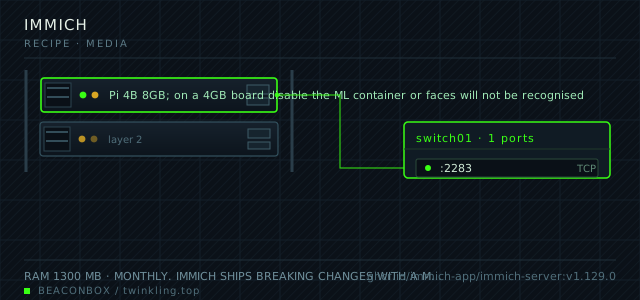
| image | ghcr.io/immich-app/immich-server:v1.129.0 |
|---|---|
| host ports | :2283/tcp |
| volume path | /srv/homelab/immich/library |
| RAM | 1300 MB |
| CPU share | 1.5 vCPU (cpus: "1.5") — the machine learning container is the only reason it needs more than one |
| update cadence | monthly. Immich ships breaking changes with a migration script; read the release notes before pulling, and never skip a release that carries a migration |
| arm64 | arm64 native for both server and machine learning containers; CLIP and face models run on CPU and a Pi 4 spends about four seconds per new photo on them |
| host | container | proto | exposed | used for |
|---|---|---|---|---|
| :2283 | 2283 | tcp | LAN only | web UI, the phone apps and the upload API |
Deployment steps
Create the four directories with the ownership each container expects
The server writes as its own uid, Postgres needs 999, and the ML cache just needs to exist. Getting Postgres ownership wrong gives a container that restarts forever with a permission error in the log.
run sudo mkdir -p /srv/homelab/immich/{library,db,model-cache} sudo chown -R 1000:1000 /srv/homelab/immich/library sudo chown -R 999:999 /srv/homelab/immich/dbGenerate the database password into the env file
Every container in the stack reads the same password from the compose environment. Generating it once and never typing it again is what keeps them in sync.
run echo "IMMICH_DB_PASSWORD=$(openssl rand -base64 24 | tr -d '/+=')" >> /srv/homelab/.env chmod 600 /srv/homelab/.envStart the database first and wait for the healthcheck
The server performs migrations on boot. Starting it against a database that is still initialising produces a migration error that looks like a corrupt database.
run cd /srv/homelab/immich && docker compose up -d immich-db immich-redis until docker exec immich-db pg_isready -U immich; do sleep 2; done docker compose up -dCreate the household accounts, then close registration
The first account you create with the sign-up form becomes the admin. Add everyone else, then turn registration off in the admin settings — this is a one-click change that closes the instance to strangers.
run # Admin -> Settings -> User Settings -> disable 'Registration' # then create each person's account from Admin -> Users -> Create userImport in stages and check the temperature
A Pi 4 with a passive case will hit 80 degrees during a large import and start throttling, which makes the import take even longer. Watch the temperature and consider a fan for the first import.
run vcgencmd measure_temp docker stats --no-stream immich-server immich-ml
Four containers, and what each one costs
The stack is a server, a Postgres database with the vector extensions, a Redis queue, and the machine learning worker. On a Pi, the ML worker is the one to think about: it spends about four seconds of CPU on every new photo for CLIP embeddings and face detection, which is fine for a phone upload of twenty photos and painful for a first import of forty thousand.
| container | RAM | what it does | can you drop it |
|---|---|---|---|
| immich-server | 1.1 GB | API, web UI, thumbnails, transcoding | no |
| immich-db | 400 MB | Postgres with vectorchord and pgvecto.rs | no |
| immich-redis | 45 MB | job queue for thumbnails and ML | no |
| immich-ml | 700 MB peak | CLIP search and face recognition | yes, at the cost of search and faces |
The first import is the hard part
Forty thousand photos with the ML worker enabled on a Pi 4 takes about two days of background work, during which the board is warm and everything else on it feels slow. Doing it in stages is far better: import with ML disabled, let thumbnails and metadata finish, then enable ML overnight and let it work through the library in batches.
The job concurrency setting is what makes this bearable. The defaults assume a server with cores to spare; setting the thumbnail and ML concurrency to 1 on a Pi keeps interactive use of the rest of the rack responsive.
docker exec -it immich-server immich-admin list-jobs
# then in the admin UI: Settings -> Job Settings -> Thumbnail Generation / Smart Search
# set concurrency to 1 and start the job manually rather than letting it queue
Why the database cannot be the stock Postgres image
Immich's smart search stores image embeddings as vectors and queries them by cosine distance. That needs the vectorchord and pgvecto.rs extensions, which are not in the official postgres image, so the project publishes its own. Swapping in a plain postgres:16 gives you a server that starts, uploads fine, and fails the moment smart search runs.
For the same reason, the database is not something you can casually move to a managed service. Keep the volume on the local SSD, and keep the pg_dump backup routine.
docker exec immich-db psql -U immich -d immich -c '\dx'
# expect vectorchord and vectors extensions in the list
Storage layout and the external library question
By default Immich copies every upload into its own library directory and organises it by user and date. That is the right default: it owns the files and the database is the source of truth.
An external library points at an existing folder on the NAS and indexes it in place. That is what people with a 300 GB existing photo folder want, and it works — but the folder must be mounted read-only or Immich will move and rename files in a structure you already had opinions about.
# external library mount, read-only on purpose
      - /mnt/nas/photos-archive:/mnt/photos-archive:ro
compose file
Drop the whole file at /srv/homelab/immich/compose.yaml. Tags are pinned, never latest: rolling back on a Pi is far more work than upgrading.
services:
  immich-server:
    image: ghcr.io/immich-app/immich-server:v1.129.0
    container_name: immich-server
    restart: unless-stopped
    ports:
      - "2283:2283/tcp"
    environment:
      TZ: Asia/Shanghai
      DB_HOSTNAME: immich-db
      DB_USERNAME: immich
      DB_PASSWORD: ${IMMICH_DB_PASSWORD}
      DB_DATABASE_NAME: immich
      REDIS_HOSTNAME: immich-redis
      IMMICH_MACHINE_LEARNING_URL: http://immich-ml:3003
    volumes:
      - /srv/homelab/immich/library:/usr/src/app/upload
      - /etc/localtime:/etc/localtime:ro
    depends_on:
      immich-db:
        condition: service_healthy
    networks: [rack]

  immich-ml:
    image: ghcr.io/immich-app/immich-machine-learning:v1.129.0
    container_name: immich-ml
    restart: unless-stopped
    volumes:
      - /srv/homelab/immich/model-cache:/cache
    networks: [rack]

  immich-redis:
    image: redis:7.4-alpine
    container_name: immich-redis
    restart: unless-stopped
    networks: [rack]

  immich-db:
    image: ghcr.io/immich-app/postgres:14-vectorchord0.4.3-pgvectors0.2.0
    container_name: immich-db
    restart: unless-stopped
    environment:
      POSTGRES_USER: immich
      POSTGRES_PASSWORD: ${IMMICH_DB_PASSWORD}
      POSTGRES_DB: immich
    volumes:
      - /srv/homelab/immich/db:/var/lib/postgresql/data
    healthcheck:
      test: ["CMD-SHELL", "pg_isready -U immich"]
      interval: 10s
      timeout: 5s
      retries: 6
    networks: [rack]

networks:
  rack:
    external: true
Hardening checklist
- registration is closed after the household accounts are created, so the instance cannot be joined by anyone who finds the URL
- upload access is over the LAN or through WireGuard, never a forwarded port
- the database listens on the container network only and has no published port at all
- the machine learning container has no ports and no internet access beyond the model download at first start
Backup plan
the library is a plain directory of files with a readable structure, so it goes to the NAS with rsync nightly and the NAS handles off-site. The database is dumped separately with pg_dump — without it you lose albums, faces and the mapping between files and dates, and the library becomes an unsorted pile of correctly named files.
Verify it went in clean
- A photo uploaded from the phone app appears in the timeline within a few seconds and has a thumbnail
- Smart search works for an obvious query like 'dog', which proves the vector extensions and the ML worker are both functioning
- The nightly pg_dump restores into a scratch database with the same asset count
- The library directory on disk contains readable year folders, so the files are usable even without the database
What bit us
- Swapping the published Postgres image for the stock one breaks smart search with an extension error the moment it runs, and nothing in the UI says 'wrong database image'.
- Enabling ML on the first import of a large library turns the Pi into a space heater for two days. Import first, index later.
- An external library mounted read-write is how people wake up to a reorganised archive. Mount it read-only and let Immich index rather than manage it.
- The video transcoding settings default to hardware acceleration that the Pi does not have for most codecs. Leave them on software and set a low concurrency rather than fighting the presets.
Hardware questions
- Is a Pi 4 really enough for Immich, or is this a job for the NAS?
- A Pi 4B with 8 GB handles a household library of fifty to eighty thousand photos, as long as you import in stages and keep ML concurrency at 1. The NAS with an x86 processor will do it faster and with less heat, but it also means your photo library lives on the machine that also stores your backups.
- How long does the first import actually take?
- Thumbnails and metadata: roughly two hundred photos per minute on a Pi 4, so 40,000 photos is about three and a half hours. With ML enabled, add about four seconds per photo across the whole library, which is where the two-day figure comes from.
- Can I keep using Google Photos at the same time?
- Yes, and for the first month you should. Run both, upload to Immich in parallel, and only cancel the other subscription once you have restored a photo from the Immich library and know the backup works. The migration is not reversible in the direction people assume.