Deployment recipe · Files & storage
Nextcloud on a Pi 4: the database is the part that hurts
Nextcloud is the heaviest thing on this rack and the one with the most ways to fail quietly. It is worth running anyway, because file sync that belongs to you beats file sync rented by the month. What follows is the split that makes it survive: data on the NAS, database in MariaDB rather than SQLite, PHP tuned so uploads actually complete, and the four config.php values that stop the proxy from breaking every generated link.
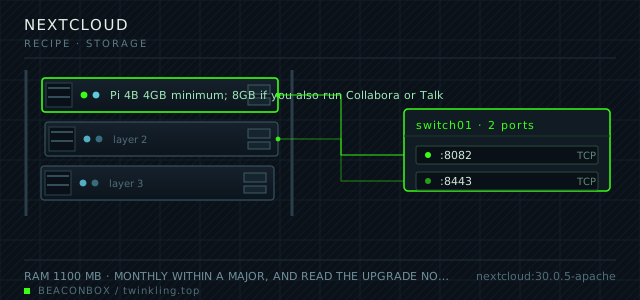
| image | nextcloud:30.0.5-apache |
|---|---|
| host ports | :8082/tcp, :8443/tcp |
| volume path | /srv/homelab/nextcloud/html |
| RAM | 1100 MB |
| CPU share | 1.0 vCPU (cpus: "1.0") |
| update cadence | monthly within a major, and read the upgrade notes before every major — Nextcloud skips no majors, 29 to 31 is not a supported jump |
| arm64 | arm64 native since 25; the apache tag is the one to use because the fpm tag has no web server inside it |
| host | container | proto | exposed | used for |
|---|---|---|---|---|
| :8082 | 80 | tcp | LAN only | web UI, WebDAV and desktop client sync |
| :8443 | 443 | tcp | LAN only | direct TLS for clients that refuse plain http on the LAN |
Deployment steps
Create both volumes with the right ownership
The apache image runs PHP as uid 33 (www-data). Both the web root and the database directory must be writable by that uid, and the NAS mount must be exported with matching ownership.
run sudo mkdir -p /srv/homelab/nextcloud/{html,db} sudo chown -R 33:33 /srv/homelab/nextcloud/html sudo chown -R 999:999 /srv/homelab/nextcloud/db sudo mkdir -p /mnt/nas/nextcloud-data && sudo chown -R 33:33 /mnt/nas/nextcloud-dataMount the NAS share on the host with a stable export
NFS is the right choice here: it preserves uid 33 and does not have CIFS's per-request overhead on the small stat calls Nextcloud makes constantly.
run # /etc/fstab 192.168.10.5:/export/nextcloud /mnt/nas/nextcloud-data nfs4 rw,hard,timeo=100,retrans=3,nofail,x-systemd.automount 0 0 sudo mount -a && findmnt /mnt/nas/nextcloud-dataStart the database first, then the app
The app container runs its installer on first boot and fails if the database is not accepting connections yet. depends_on alone does not wait for readiness — the healthcheck does.
run cd /srv/homelab/nextcloud && docker compose up -d nextcloud-db docker exec nextcloud-db mariadb -unextcloud -p"$NC_DB_PASSWORD" -e 'select 1' docker compose up -d nextcloudSet the trusted domains before you log in
Logging in on an address that is not in trusted_domains gives a 400 error that looks like a broken install. Set the values first, then open the UI.
run docker exec -u www-data nextcloud php occ config:system:set trusted_domains 0 --value="cloud.lan" docker exec -u www-data nextcloud php occ config:system:set trusted_domains 1 --value="192.168.10.20"Fix the maintenance cron and run the first full scan
The first files:scan is slow and should be run from the command line, not by opening the web UI. On a NAS-backed data directory with 200 GB it takes about forty minutes on a Pi 4.
run docker exec -u www-data nextcloud php occ background:cron docker exec -u www-data nextcloud php occ files:scan --all docker exec -u www-data nextcloud php occ status
Why MariaDB and not the default SQLite
The image works out of the box with SQLite, and for a single user with a small library it is genuinely fine. It stops being fine the moment a desktop client starts syncing a directory tree while a phone uploads photos: SQLite serialises writes, and the file lock contention shows up as sync errors that do not mention the database at all.
MariaDB costs about 450 MB and one more container. The buffer pool is set to 512 MB, which is the single most effective tuning knob on a Pi: with the default 128 MB, every metadata query that misses the cache goes to disk on an SBC's slow storage.
command: --transaction-isolation=READ-COMMITTED --innodb-buffer-pool-size=512M
# READ-COMMITTED is Nextcloud's documented requirement, and the buffer pool
# is the difference between a snappy file list and a five-second one
Data on the NAS, code on the SSD
The data directory is mounted from the NAS over NFS rather than SMB: file ownership maps cleanly to uid 33, and Nextcloud's many small stat calls are markedly faster on NFS than on CIFS.
The web root stays on the local SSD, because PHP opcode caching wants low latency and the code is small. The split also makes the backup story easier: the NAS data is already covered by the NAS's own backup job.
| what | where | why |
|---|---|---|
| /var/www/html | local SSD, /srv/homelab/nextcloud/html | PHP wants low latency; small |
| /var/www/html/data | NAS over NFS | already covered by the NAS backup |
| /var/lib/mysql | local SSD | database I/O should not cross the network |
| backups | NAS, then off-site | the 3-2-1 rule, with the second copy off the Pi |
The four config.php values that matter behind a proxy
Nextcloud generates absolute URLs from the request it sees. Behind a reverse proxy it sees http://nextcloud:80 and faithfully hands that to your browser, which then fails to load CSS on a page that looked fine in curl.
Four values fix all of it: trusted_domains, overwriteprotocol, overwrite.cli.url and overwritehost. The last one is the one people miss, and it is the one that makes the mobile apps' share links wrong rather than merely insecure.
docker exec -u www-data nextcloud php occ config:system:set trusted_domains 0 --value="cloud.lan"
docker exec -u www-data nextcloud php occ config:system:set overwriteprotocol --value="https"
docker exec -u www-data nextcloud php occ config:system:set overwrite.cli.url --value="https://cloud.lan"
docker exec -u www-data nextcloud php occ config:system:set overwritehost --value="cloud.lan"
Making uploads actually finish
The default PHP limits in the image allow 512 MB uploads, which is smaller than a phone video and much smaller than a camera raw. The two environment variables PHP_UPLOAD_LIMIT and PHP_MEMORY_LIMIT are the supported way to change them; editing php.ini by hand works until the next image pull replaces the file.
The other half is chunked upload, which the desktop client uses automatically above 10 MB. If uploads fail at a consistent size, the limit you are hitting is the proxy's, not PHP's.
# confirm what PHP actually has, rather than what you think you set
docker exec nextcloud php -i | grep -E 'upload_max_filesize|post_max_size|memory_limit'
The background job nobody sets up
Out of the box Nextcloud runs maintenance with AJAX, meaning a cron job that only fires when someone opens a page. The admin overview will complain about it in an orange box that people learn to ignore.
Set the mode to cron and call the cron.php endpoint every five minutes from the host. It is two lines and it is the difference between a file scanner that keeps up and one that runs a full rescan every time you look at it.
docker exec -u www-data nextcloud php occ background:cron
# then on the host:
# */5 * * * * docker exec -u www-data nextcloud php -f /var/www/html/cron.php
compose file
Drop the whole file at /srv/homelab/nextcloud/compose.yaml. Tags are pinned, never latest: rolling back on a Pi is far more work than upgrading.
services:
  nextcloud:
    image: nextcloud:30.0.5-apache
    container_name: nextcloud
    restart: unless-stopped
    ports:
      - "8082:80/tcp"
      - "8443:443/tcp"
    environment:
      TZ: Asia/Shanghai
      MYSQL_HOST: nextcloud-db
      MYSQL_DATABASE: nextcloud
      MYSQL_USER: nextcloud
      MYSQL_PASSWORD: ${NC_DB_PASSWORD}
      NEXTCLOUD_ADMIN_USER: ${NC_ADMIN_USER}
      NEXTCLOUD_ADMIN_PASSWORD: ${NC_ADMIN_PASSWORD}
      NEXTCLOUD_TRUSTED_DOMAINS: "cloud.lan rack.twinkling.top"
      OVERWRITEPROTOCOL: https
      PHP_MEMORY_LIMIT: 512M
      PHP_UPLOAD_LIMIT: 16G
    volumes:
      - /srv/homelab/nextcloud/html:/var/www/html
      - /mnt/nas/nextcloud-data:/var/www/html/data
    depends_on: [nextcloud-db]
    networks: [rack]

  nextcloud-db:
    image: mariadb:11.4
    container_name: nextcloud-db
    restart: unless-stopped
    command: --transaction-isolation=READ-COMMITTED --innodb-buffer-pool-size=512M
    environment:
      MARIADB_ROOT_PASSWORD: ${NC_ROOT_PASSWORD}
      MARIADB_DATABASE: nextcloud
      MARIADB_USER: nextcloud
      MARIADB_PASSWORD: ${NC_DB_PASSWORD}
    volumes:
      - /srv/homelab/nextcloud/db:/var/lib/mysql
    networks: [rack]

networks:
  rack:
    external: true
Hardening checklist
- the trusted_domains array lists only the proxy hostname and the LAN address; anything else is refused with a 400
- overwrite.cli.url and overwriteprotocol are set so generated links never leak the container hostname
- the admin account is not used for daily sync; each person has their own account and the admin one has no data in it
- two-factor is enforced for every account in the admin group
- the data directory sits outside the web root so a web server misconfiguration cannot serve raw files
- apps are installed from the built-in store only, and the app store is checked after every update for disabled apps due to signature problems
Backup plan
three parts, and all three are needed: the database dumped with mysqldump every night, the config directory with config.php and the apps, and the data directory. Restoring requires putting back the matching database and the matching config, because the instance id and secret live in config.php and a mismatched pair logs every client out with a server-side error.
Verify it went in clean
- The admin overview shows no warnings other than the ones you have consciously accepted
- A 4 GB upload completes from the desktop client, which proves the PHP limits, the chunking and the proxy body limit are all consistent
- Share links open on a phone outside the LAN through WireGuard, with the correct hostname in the URL
- The background job mode reads cron, and the job list shows tasks ran within the last five minutes
What bit us
- Mixing a restored database with a config.php from a different install logs every client out with a server-side error and a broken instance id. Back up and restore the two together.
- The apache image writes logs inside the container. Without a logrotate or a max-size on the json-file driver, a sync loop can fill the container's writable layer and the site goes down with a disk full error that points at nothing.
- A full files:scan on a NAS-backed data directory at the default PHP memory limit dies about halfway. Set PHP_MEMORY_LIMIT to 512M before the first scan, not after.
- Nextcloud refuses to skip major versions. 29 to 31 is not an upgrade path; you go 29, 30, 31 and run the updater three times.
Hardware questions
- Is a Pi 4 enough for Nextcloud, or should this run on the NAS?
- One or two users with file sync: a Pi 4B with 4 GB is fine. Once you add Talk, Collabora or more than four accounts, the NAS is the better host — Nextcloud's bottleneck is PHP worker concurrency, and a Pi has four cores. This rack keeps Nextcloud on the Pi because the NAS is a backup target, not a compute node, and moving work onto it would mean backing up the machine that holds the backups.
- MariaDB, PostgreSQL or SQLite?
- MariaDB, and specifically the READ-COMMITTED isolation level Nextcloud documents as a requirement. PostgreSQL is equally good and slightly faster on some queries; SQLite is fine only until two clients sync at the same moment, and the failure it produces is a sync error that never mentions the database.
- How much RAM should I reserve for the whole stack?
- 1.1 GB for the app container with two sync clients, 512 MB for MariaDB's buffer pool plus overhead, and 300 MB of headroom. That is 2 GB of a 8 GB board, which leaves room for Jellyfin on the same machine.