Deployment recipe · Network & access
Caddy as the only door into the rack
Every service on this rack is reachable through one reverse proxy and nothing else. Caddy was picked over nginx for one reason: it obtains and renews its own certificates with a four-line config, and on a home network that removes the single most annoying recurring task. What follows is the Caddyfile that fronts nine services, the internal-CA trick for names that never leave the house, and the two mistakes that cost an afternoon each.
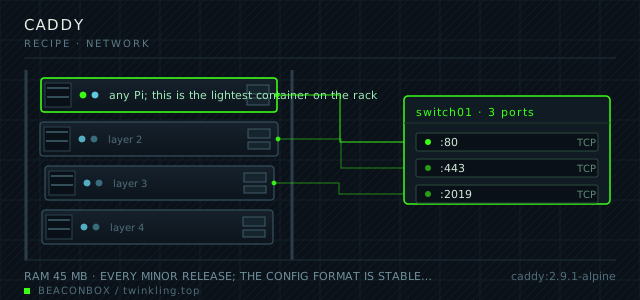
| image | caddy:2.9.1-alpine |
|---|---|
| host ports | :80/tcp, :443/tcp, :2019/tcp |
| volume path | /srv/homelab/caddy/data |
| RAM | 45 MB |
| CPU share | 0.20 vCPU (cpus: "0.20") |
| update cadence | every minor release; the config format is stable, and Caddy's own automatic HTTPS is the part worth keeping current |
| arm64 | arm64 native; the alpine tag is 60 MB on disk and starts in under a second |
| host | container | proto | exposed | used for |
|---|---|---|---|---|
| :80 | 80 | tcp | public | ACME HTTP-01 challenge and the permanent redirect to https |
| :443 | 443 | tcp | public | every web front end on the rack, one hostname each |
| :2019 | 2019 | tcp | loopback | admin API, bound to loopback only |
Deployment steps
Create the rack network if it does not exist
The proxy can only see container names that are on its own network. One bridge network for the whole rack, created once, referenced as external by every compose file.
run docker network create rack --subnet 172.20.0.0/24 --gateway 172.20.0.1 || true docker network ls --filter name=rackWrite the Caddyfile, then check it before starting
caddy validate parses the file without touching the certificates. Running it first turns a broken config from a crash loop into a one-line error message.
run sudo mkdir -p /srv/homelab/caddy/{data,config} docker run --rm -v /srv/homelab/caddy/Caddyfile:/etc/caddy/Caddyfile:ro caddy:2.9.1-alpine caddy validate --config /etc/caddy/CaddyfileStart it and watch the first certificate issue
The first start performs the ACME challenge for the public hostname. If port 80 is not reachable from the internet yet, this is where you find out — in the log, in plain text.
run cd /srv/homelab/caddy && docker compose up -d docker logs -f --tail 40 caddyTrust the internal root on your own devices
Only needed for .lan names. Copy the root certificate out and add it to the trust store of each device that should see a padlock.
run docker cp caddy:/data/caddy/pki/authorities/local/root.crt /tmp/beaconbox-root.crt ls -l /tmp/beaconbox-root.crtReload without dropping connections
Never restart the proxy to apply a config change: a restart drops keep-alive connections for every service at once. caddy reload swaps the config in place.
run docker exec caddy caddy reload --config /etc/caddy/Caddyfile docker exec caddy caddy list-modules | head -3
One door, and what that buys you
The rack has exactly two public ports: 80 and 443, both on Caddy. Nothing else is forwarded, so the attack surface of the whole house is one binary that is designed to be exposed.
It also fixes the port-number problem. Behind the proxy, every service can listen on its upstream default — Grafana on 3000, Immich on 2283, Uptime Kuma on 3001 — and you reach them by name instead of by remembering numbers. The port band still exists for the panels you hit directly on the LAN, but day to day you type grafana.lan.
Internal certificates for .lan names
Public ACME cannot issue for a name that does not exist in public DNS, and a self-signed certificate you generate by hand has to be re-trusted on every device. Let's Encrypt's own documentation for private networks is what Caddy implements as tls internal: it runs a local CA, issues to your hostname, and you install one root certificate once per device.
The root is written to /data/caddy/pki/authorities/local/root.crt in the container's data volume. Copy it to your laptop, add it to the trust store, and every .lan name gets a padlock with no warnings.
# copy the local root out of the container and trust it on a Mac
sudo docker cp caddy:/data/caddy/pki/authorities/local/root.crt ./beaconbox-root.crt
sudo security add-trusted-cert -d -r trustRoot -k /Library/Keychains/System.keychain ./beaconbox-root.crt
The Caddyfile, and why there is only one
There is no include system and no sites-available directory, because there does not need to be one. A Caddyfile this size is readable in a single screen, and a file you can read in one screen is a file you will actually review before changing.
The (secure) snippet carries the header policy, and the (lan) snippet carries the internal TLS plus the LAN-only address match. Each service block is then three lines.
(secure) {
  header {
    Strict-Transport-Security "max-age=31536000; includeSubDomains"
    X-Content-Type-Options "nosniff"
    Referrer-Policy "strict-origin-when-cross-origin"
  }
}

(lan) {
  tls internal
  @notlan not remote_ip 192.168.10.0/24 172.20.0.0/24
  respond @notlan "not here" 403
}

rack.twinkling.top {
  import secure
  reverse_proxy jellyfin:8096
}

grafana.lan {
  import lan
  reverse_proxy grafana:3000
}

immich.lan {
  import lan
  reverse_proxy immich-server:2283
}
Pointing at container names
reverse_proxy takes the container name directly because Caddy joins the same user-defined bridge network as everything else. That is why every compose file on this rack ends with networks: [rack] and the network itself is created once with external: true.
The corollary is that container_name matters. Rename a container and every proxy entry pointing at the old name starts returning 502 while the container itself is perfectly healthy.
docker exec caddy wget -qO- http://immich-server:2283/api/server/ping
# if this fails from inside caddy, the problem is the network, not the config
Logs, and keeping them small
Access logs are off by default and that is the right default for a house. Turn them on for one hostname at a time when you are debugging, and let the host's logrotate deal with them rather than the container.
What is worth keeping permanently is the certificate renewal line. One grep a month tells you whether automatic HTTPS is still doing its job.
docker logs --since 720h caddy 2>&1 | grep -i 'certificate obtained' | tail -5compose file
Drop the whole file at /srv/homelab/caddy/compose.yaml. Tags are pinned, never latest: rolling back on a Pi is far more work than upgrading.
services:
  caddy:
    image: caddy:2.9.1-alpine
    container_name: caddy
    restart: unless-stopped
    ports:
      - "80:80"
      - "443:443"
      - "127.0.0.1:2019:2019"
    environment:
      ACME_EMAIL: [email protected]
    volumes:
      - /srv/homelab/caddy/Caddyfile:/etc/caddy/Caddyfile:ro
      - /srv/homelab/caddy/data:/data
      - /srv/homelab/caddy/config:/config
    networks: [rack]

networks:
  rack:
    external: true
Hardening checklist
- the admin API binds to 127.0.0.1:2019 so a stray curl on the LAN cannot rewrite the config
- no service is exposed directly; every hostname resolves to Caddy and Caddy decides who gets in
- basic auth on the two panels that have no login of their own, with the hash generated by caddy hash-password
- security headers (HSTS, X-Content-Type-Options, Referrer-Policy) set once in a snippet and imported by every site block
- tls internal for the .lan hostnames, real certificates only for the two names that leave the house
Backup plan
the Caddyfile lives in git, which is the real backup. /srv/homelab/caddy/data holds the ACME account key and the issued certificates and is copied weekly; losing it costs one re-issue per hostname, not an outage.
Verify it went in clean
- curl -I https://rack.twinkling.top returns 200 with an HSTS header present
- The .lan hostnames load with a valid padlock on a device that has the internal root installed
- docker logs caddy shows 'certificate obtained successfully' for the public name after the first boot
- Port 2019 answers on the Pi itself and refuses from another machine on the LAN
What bit us
- Caddy's automatic HTTPS will try to issue a public certificate for every hostname it sees, including jellyfin.lan. If the name does not resolve publicly the challenge fails and the site never comes up — mark private names with tls internal explicitly.
- A second container publishing port 80 makes the ACME HTTP challenge fail with a connection refused from Let's Encrypt while working fine from your browser via a cached certificate. Check who owns 80 with ss -ltnp.
- The alpine image has no shell utilities beyond busybox. Debugging inside it with dig or curl means installing a variant image or testing from a neighbouring container instead.
Hardware questions
- Caddy or nginx for a home rack?
- Caddy if you want certificates to be someone else's problem, which on a home network you do. nginx if you already know nginx and want the Lua and cache modules. The performance difference at household traffic levels is not measurable; the configuration difference is a four-line file versus a certbot timer, a cron job and a renewal hook.
- How much memory does the proxy add to a 4 GB Pi?
- About 45 MB resident for nine proxied hostnames. This is one of the few containers on the rack that you can size by ignoring it.
- Should the proxy run on the same Pi as everything else?
- Yes, until it is the reason you cannot reach anything. Running it on the same board costs nothing and keeps the network simple; the day you add a second Pi is the day it becomes worth moving the proxy to the smaller one so you can reboot the busy board without taking the front door down.