Deployment recipe · DNS & filtering
Pi-hole on a Raspberry Pi: blocking DNS without taking the house offline
Pi-hole is the first container that goes on a new rack and the one that causes the most trouble, because every device in the house depends on it. This is the configuration that has run here since 2024: port 53 on the LAN, the admin UI on 8081, upstream pointed at a local Unbound rather than a public resolver, and a container restart policy that does not fight the network stack at boot.
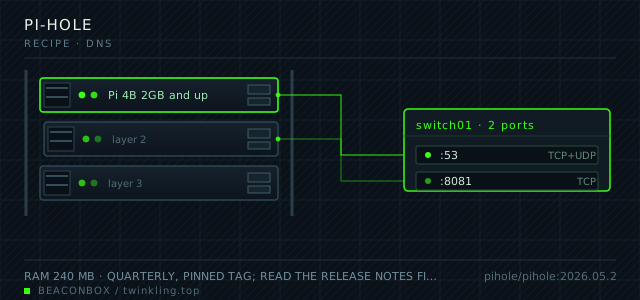
| image | pihole/pihole:2026.05.2 |
|---|---|
| host ports | :53/tcp+udp, :8081/tcp |
| volume path | /srv/homelab/pihole/etc-pihole |
| RAM | 240 MB |
| CPU share | 0.35 vCPU (cpus: "0.35") |
| update cadence | quarterly, pinned tag; read the release notes first — v6 moved every setting into FTLCONF_* env names |
| arm64 | arm64 native image; the 32-bit tag still exists but the FTL binary is faster on arm64 |
| host | container | proto | exposed | used for |
|---|---|---|---|---|
| :53 | 53 | tcp+udp | LAN only | DNS for the whole house, served by dnsmasq inside the container |
| :8081 | 80 | tcp | LAN only | admin web UI and the /admin API the other services query |
Deployment steps
Prepare the host directories and the secret
Create the volume path before the first start. If Docker creates it for you it lands as root, and FTL then cannot write its own database after an update.
run sudo mkdir -p /srv/homelab/pihole/etc-pihole sudo chown -R 1000:1000 /srv/homelab/pihole echo "PIHOLE_PASSWORD=$(openssl rand -base64 18)" >> /srv/homelab/.env chmod 600 /srv/homelab/.envCreate the shared rack network once
Fixed IPs on a named bridge network are what let the upstream address stay stable across restarts. Allocate the subnet once and reuse it for every container on the rack.
run docker network create rack --subnet 172.20.0.0/24 --gateway 172.20.0.1 docker network inspect rack -f '{{range .IPAM.Config}}{{.Subnet}}{{end}}'Bring up Unbound first, then Pi-hole
Pi-hole's upstream has to be listening before the first query arrives, otherwise the container log fills with SERVFAIL for the first minute after every reboot.
run cd /srv/homelab/unbound && docker compose up -d docker exec unbound drill @127.0.0.1 -p 5335 example.com >/dev/null && echo "resolver ok" cd /srv/homelab/pihole && docker compose up -dVerify from a client, not from the host
The host resolves through its own stub resolver, so a test on the Pi tells you almost nothing. Point one laptop at the Pi and check the answer time and the blocking behaviour there.
run dig @192.168.10.20 ads.doubleclick.net +short dig @192.168.10.20 github.com +short # blocked name returns 0.0.0.0, real name returns an address in under 20 msMove the DHCP client list over before you forget
Pi-hole can answer DHCP too, and once it does the query log shows hostnames instead of bare IP addresses. That is the difference between a log you can read and a wall of numbers.
run docker exec pihole pihole-FTL --config dhcp.active true docker exec pihole pihole-FTL --config dhcp.start 192.168.10.100 docker exec pihole pihole-FTL --config dhcp.end 192.168.10.240
Why port 53 is the whole job
Pi-hole is a DNS server in front of a blocklist. Everything else about it — the dashboard, the query log, the client groups — is reporting on that one function. So the only two decisions that matter are where it answers and who it asks.
It answers on the LAN only. The container publishes 53 on the Pi's LAN address, nothing is forwarded at the router, and FTLCONF_dns_listeningMode is set explicitly rather than left to the default, because a resolver that answers anyone is an open relay.
It asks a local Unbound instance on the container network at 172.20.0.3, not 8.8.8.8. That keeps the query log local, removes the per-look-up latency of a round trip to a public resolver, and means the house keeps resolving when the WAN drops.
Setting the port bands up front
Pick the ports before the second container exists, not after. This rack uses 53xx for DNS and filtering, 80xx for web front ends, and keeps upstream defaults where an application has a famous one. Pi-hole keeps 53 for DNS, which is unavoidable, and takes 8081 for the UI so 80 stays free for the reverse proxy.
| band | used for | taken on this rack |
|---|---|---|
| 53 / 5335 | DNS | Pi-hole 53, Unbound 5335 |
| 80xx | web front ends | 8081 Pi-hole, 8082 Nextcloud, 8096 Jellyfin |
| 90xx | metrics | 9090 Prometheus, 9091 Authelia |
| upstream defaults | apps with a famous port | 3000 Grafana, 3001 Uptime Kuma, 2283 Immich |
The v6 environment-variable change
Pi-hole v6 replaced the old setupVars.conf and the WEBPASSWORD environment variable with FTLCONF_* names read by FTL itself. Copying a compose file written for v5 gives you a container that starts, serves DNS, and silently ignores the password you set — the UI then asks you to set one on first visit and forgets it after the next recreate.
The three that matter here are FTLCONF_webserver_api_password, FTLCONF_dns_upstreams and FTLCONF_dns_listeningMode. Anything still named WEBPASSWORD in your file is a v5 leftover.
docker exec pihole pihole-FTL --config webserver.api.password
# v6: prints the hash FTL is actually using. An empty value means your env var was ignored.
Ordering against the network at boot
The failure people hit is not a crash, it is a race. The container starts before the Pi has a LAN address, dnsmasq binds to nothing, and every device in the house gets a resolution failure until you restart the container by hand.
restart: unless-stopped covers the restart itself, but it does not cover the ordering. What fixes it properly is a systemd drop-in on the host that waits for the network to be online before Docker starts, which is the same change that keeps every other container from fighting for an address at boot.
sudo systemctl edit docker.service
# [Unit]
# After=network-online.target
# Wants=network-online.target

sudo systemctl daemon-reload && sudo systemctl restart docker
Client groups do more than the blocklists
The default group blocks ads for everything on the network, which is roughly right and occasionally wrong: a smart TV that breaks when telemetry is blocked, a work laptop that needs a domain the list considers an ad server.
Two groups solve it here. A 'kids' group with the stricter lists applied to the tablets, and a 'no-block' group with nothing enabled, applied to exactly two MAC addresses. Adding a device to the second group takes ten seconds and saves a support call.
compose file
Drop the whole file at /srv/homelab/pihole/compose.yaml. Tags are pinned, never latest: rolling back on a Pi is far more work than upgrading.
services:
  pihole:
    image: pihole/pihole:2026.05.2
    container_name: pihole
    hostname: pihole
    restart: unless-stopped
    ports:
      - "53:53/tcp"
      - "53:53/udp"
      - "8081:80/tcp"
    environment:
      TZ: Asia/Shanghai
      FTLCONF_webserver_api_password: ${PIHOLE_PASSWORD}
      FTLCONF_dns_upstreams: "172.20.0.3#5335"
      FTLCONF_dns_listeningMode: "all"
      FTLCONF_dns_domain: "lan"
    volumes:
      - /srv/homelab/pihole/etc-pihole:/etc/pihole
    cap_add:
      - NET_ADMIN
      - SYS_NICE
    logging:
      driver: json-file
      options: { max-size: "10m", max-file: "3" }
    networks:
      rack:
        ipv4_address: 172.20.0.2

networks:
  rack:
    name: rack
    ipam:
      config:
        - subnet: 172.20.0.0/24
Hardening checklist
- the web UI is reachable only from the LAN VLAN; port 8081 is never forwarded at the router
- FTLCONF_webserver_api_password comes from /srv/homelab/.env (mode 600), not from the compose file
- DNS is bound to the LAN interface only, so the Pi does not answer recursive queries arriving from the internet
- admin API access from the reverse proxy is limited to the two services that need it, with the Pi-hole password in a separate Caddy snippet
Backup plan
the whole /etc/pihole directory nightly at 03:10 to the SMB share on the NAS with rclone, 14 daily snapshots kept, plus a copy of gravity.db after every adlist rebuild. If the Pi dies, restoring the directory onto a fresh card brings back blocklists, local DNS records and client groups without re-running the installer.
Verify it went in clean
- dig against the Pi returns the blocked 0.0.0.0 answer for an ad hostname and a real address for a normal one
- the container log is free of 'no upstream servers' lines after a reboot from cold
- docker stats shows the container under 300 MB after 24 hours, which is when dnsmasq's cache has settled
- the admin UI loads over the LAN and refuses from a phone on the guest network
What bit us
- An SD card that has been writing query logs for a year dies without warning. Move /etc/pihole onto a USB SSD, or at minimum set max-file: "3" on the json-file log driver so FTL's own logs cannot fill the card.
- Setting a Pi-hole password through the web UI on a container that also receives FTLCONF_webserver_api_password means the next recreate silently reverts to the env value. Keep one source of truth: the .env file.
- Blocking the telemetry domains of a smart TV can make it lose its pairing every time it reboots. That is what the no-block group is for.
- The 2026.05 image runs as user 1000. A volume directory owned by root makes the container start and then fail on the first gravity run with a permission error in the log.
Hardware questions
- How much RAM does Pi-hole really need on a 2 GB board?
- Around 250 MB resident with the default lists and a 10,000-entry cache. The figure people quote of 100 MB comes from a v5 container on a quiet network. On a 2 GB Pi 4 that leaves plenty of room, but if you also run Immich or Jellyfin on the same board, budget 240 MB for Pi-hole in your total.
- Can I run Pi-hole and Unbound in one container?
- You can, and some images do. Keeping them apart is worth the extra 90 MB: when a blocklist rebuild goes wrong you restart Pi-hole without dropping the resolver, and you can point a second Pi-hole at the same Unbound if you ever add a redundancy node.
- Pi 5 or Pi 4 for a DNS box?
- Pi 4B, and ideally the 2 GB one. DNS is a latency problem, not a throughput problem — a Pi 4 answers a cached query in about 1 ms, and the Pi 5's faster cores change nothing you can measure from a browser. Spend the difference on the SSD.