Service card · Media
Audiobookshelf: progress that follows you between the car and the kitchen
The point of an audiobook server is not the files, it is the position. A phone playing an MP3 through a file browser loses it every time; Audiobookshelf keeps the position, the speed and the bookmarks on the server, so the same book continues on the car stereo, the kitchen speaker and the laptop without anyone navigating to a folder.
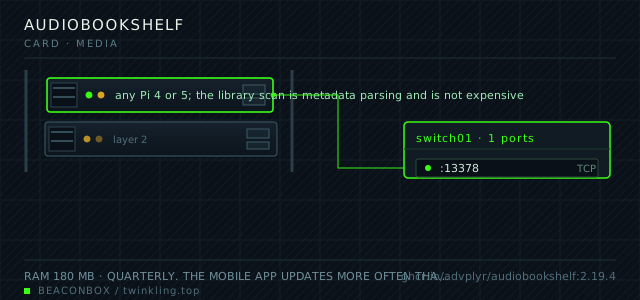
| image | ghcr.io/advplyr/audiobookshelf:2.19.4 |
|---|---|
| host ports | :13378/tcp |
| volume path | /srv/homelab/audiobookshelf/config |
| RAM | 180 MB |
| CPU share | 0.40 vCPU (cpus: "0.40") — transcoding for mobile clients is the peak |
| update cadence | quarterly. The mobile app updates more often than the server, and the server usually needs to be within a few versions of it |
| arm64 | arm64 native including the ffmpeg build used for streaming and chapter embedding |
| host | container | proto | exposed | used for |
|---|---|---|---|---|
| :13378 | 80 | tcp | LAN only | web player and the mobile app API |
Deployment steps
Create the config and metadata directories and hand them over
Both have to be writable by the container's uid. A read-only mount on either one gives a server that serves the library and silently fails to save progress.
run sudo mkdir -p /srv/homelab/audiobookshelf/{config,metadata} sudo chown -R 1000:1000 /srv/homelab/audiobookshelfMount the library read-only and point the scanner at it
Read-only is deliberate: the scanner reads tags into its own database and never writes back into the files. Fixing a tag means editing the file on the NAS and rescanning.
run cd /srv/homelab/audiobookshelf && docker compose up -d # in the UI: Settings -> Add Library -> Audiobooks -> /audiobooks docker logs --tail 30 audiobookshelf | grep -i scanAdd a podcast feed and cap how many episodes are kept
Without a retention setting the podcast directory grows forever on the SSD. Set the episode limit per show when the feed is added, not after the disk fills.
run # Library -> Add Podcast -> paste the RSS URL du -sh /srv/homelab/audiobookshelf/metadata/feeds # then set 'episodes to keep' on the show
Where the files come from, and the one thing to get right
Audiobooks are the one media type where the folder structure matters more than the tags, because a book is a folder of chapter files and the scanner uses the folder as the unit. One folder per book, author folders above it, and a cover.jpg or an embedded cover in the first track.
Getting this right before the first scan is worth ten minutes; fixing it after means the library shows a hundred books as one book with a hundred chapters, or worse, as a hundred separate books.
# /mnt/nas/audiobooks/
#   Author Name/
#     Book Title/
#       01 - Chapter.mp3
#       02 - Chapter.mp3
#       cover.jpg
#       metadata.json  (optional)
Streaming versus transcoding
On the LAN, the app plays the original file and the Pi does no work. Over mobile data, the app can request a transcoded stream at a lower bitrate, and that is when the Pi's CPU becomes relevant: one transcode at a time on a Pi 4 is comfortable, two is not.
The concurrency setting for transcodes is the one to cap. Audiobooks are long — a transcode that takes four minutes to catch up to the listener is a bad experience, so without a cap the second listener causes both to buffer.
| situation | what happens | Pi cost |
|---|---|---|
| LAN, original file | direct play | none |
| mobile data, 64k opus | transcoded on the fly | about 12 percent of one core |
| two mobile listeners | second one queues | one core, both buffering if uncapped |
Podcasts are the underestimated half
The podcast feature downloads episodes from RSS feeds on a schedule, keeps a configurable number of recent episodes, and serves them with the same position tracking as audiobooks. For a household that listens to four or five shows, this replaces a podcast app's cloud account.
The downloads go to the metadata directory rather than the NAS, which is the right place — they are disposable, and keeping them off the NAS keeps the backup set clean.
# Add a feed: Library -> Add Podcast -> paste the RSS URL
# Set episodes to keep per show, and the check interval
# stored under /srv/homelab/audiobookshelf/metadata/feeds
compose file
Drop the whole file at /srv/homelab/audiobookshelf/compose.yaml. Tags are pinned, never latest: rolling back on a Pi is far more work than upgrading.
services:
  audiobookshelf:
    image: ghcr.io/advplyr/audiobookshelf:2.19.4
    container_name: audiobookshelf
    restart: unless-stopped
    ports:
      - "13378:80/tcp"
    environment:
      TZ: Asia/Shanghai
      AUDIOBOOKSHELF_UID: "1000"
      AUDIOBOOKSHELF_GID: "1000"
    volumes:
      - /srv/homelab/audiobookshelf/config:/config
      - /srv/homelab/audiobookshelf/metadata:/metadata
      - /mnt/nas/audiobooks:/audiobooks:ro
      - /mnt/nas/podcasts:/podcasts:ro
    networks: [rack]

networks:
  rack:
    external: true
Hardening checklist
- accounts are created per person and the first-run admin account is renamed off the default
- the media directories are mounted read-only so the scanner cannot modify tags in place
- the reverse proxy route requires the household group through the authentication portal
- the mobile app is pointed at the VPN address rather than a forwarded port, which is what keeps listening progress private
Backup plan
the audio files themselves are on the NAS and are not copied here; the config directory holds the library index, the listening progress and the user accounts, and that is what gets backed up. Progress is the part people care about — losing it means every book restarts from the beginning.
Verify it went in clean
- A book started in the mobile app continues at the same position in the browser player
- The library scan shows each book once with all its chapters, not as separate items
- A transcoded stream over mobile data plays without gaps while the Pi shows one core partially in use
- A podcast episode listened to on one device shows as played on the other
What bit us
- A folder with the book files directly in the author folder produces one enormous book. The folder structure is the metadata model, not a suggestion.
- Metadata directories must be excluded from any sync tool that also watches the NAS, or the .metadata JSON files will fight with the server writing them.
- The config and metadata directories have to be writable by the container's uid. A read-only mount on either one produces a server that starts, serves the library, and silently fails to save progress — the worst possible failure for this service.
- The mobile apps cache aggressively and often need a manual refresh to pick up a new book. This is an app behaviour, not a server problem, and reinstalling the server will not fix it.
Hardware questions
- Do I need this and Navidrome?
- They overlap less than people expect. Navidrome is for music — albums, playlists, shuffle, a large collection of short tracks. Audiobookshelf is for long-form audio where the position and the chapter structure are the entire point. A household with both a music collection and audiobooks runs both, and they cost 320 MB between them.
- Is the mobile app good enough to use daily?
- It is the best of the open-source options and it handles car use acceptably, including Android Auto. The weaknesses are the same as every self-hosted mobile app: caching behaviour that occasionally needs a manual sync, and the requirement that the server be reachable, which is what the VPN is for.
- How much space does an audiobook library take?
- About 200 to 400 MB per book at typical bitrates, so a hundred-book library is around 30 GB, plus podcast downloads which are managed by the retention setting. This is small enough to keep on the NAS without thinking about it.