Service card · Media
Navidrome: a music server that ends the streaming subscription argument
The household music collection is about 90 GB of files that have been carried between machines since before streaming existed. Navidrome indexes it, serves it to any phone or browser over the Subsonic API, and costs 140 MB of RAM. The reason it is on this rack rather than on a subscription is not cost — it is that the album you bought in 2009 is not licensed in the country you moved to.
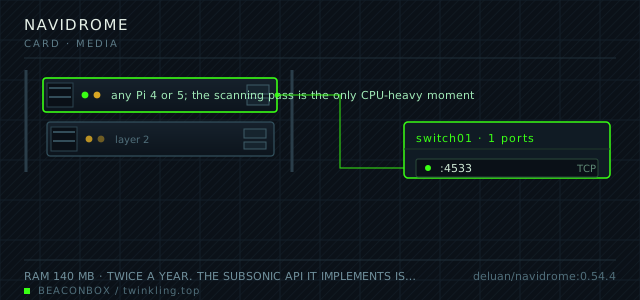
| image | deluan/navidrome:0.54.4 |
|---|---|
| host ports | :4533/tcp |
| volume path | /srv/homelab/navidrome/data |
| RAM | 140 MB |
| CPU share | 0.25 vCPU (cpus: "0.25") — transcoding happens only for clients that ask for it |
| update cadence | twice a year. The Subsonic API it implements is stable and the database migrates in place |
| arm64 | arm64 native; the transcoder shells out to ffmpeg, which is included in the image and does have the AAC encoder this time |
| host | container | proto | exposed | used for |
|---|---|---|---|---|
| :4533 | 4533 | tcp | LAN only | web player and the Subsonic API that every mobile client speaks |
Deployment steps
Mount the music read-only and cap the transcode cache
Read-only is what stops a scanner bug from reorganising an archive that took years to tag. The cache cap prevents a slow disk leak that only shows up months later.
run sudo mkdir -p /srv/homelab/navidrome/data sudo chown -R 1000:1000 /srv/homelab/navidrome # compose: - /mnt/nas/music:/music:roCreate the admin account before anyone else can reach the interface
The first visitor to the sign-up page becomes the administrator. Do this over the LAN on the day the container first runs, not the next time someone happens to browse to it.
run cd /srv/homelab/navidrome && docker compose up -d docker logs --tail 20 navidrome # open http://192.168.10.20:4533 and create the admin accountRun the first scan and compare the count against what you know
The scan is the only CPU-heavy moment. If the album count comes back far too high, the cause is almost always a missing or inconsistent album artist tag, not the server.
run docker exec navidrome navidrome scan docker exec navidrome navidrome scan --help # then check the album count against the folder count on the NAS
Read-only music, writable metadata only
The music directory is mounted read-only. Navidrome does not write tags back into the files; it reads them into its own database. That means the library on the NAS is never touched by the server, which removes an entire category of accident.
The corollary is that fixing a wrong tag means editing the file on the NAS and letting the next scan pick it up. Scans run every twelve hours, and a manual scan is one button.
docker exec navidrome navidrome scan --help
# full rescan when tags were edited in bulk:
docker exec navidrome navidrome scan -f
Transcoding is a per-client decision
On the LAN, nothing should transcode: the phone plays FLAC directly and the Pi does no work at all. Transcoding exists for the case of streaming over a mobile connection, where the original 900 kbps FLAC is more than the connection wants.
The setting that matters is the concurrency limit. With more than one concurrent transcode on a Pi, the CPU is saturated and the music stutters — which is the worst possible failure for a music player. One at a time, and let the second client wait.
| client | what it asks for | Pi CPU cost |
|---|---|---|
| browser on the LAN | original file | none |
| phone on the LAN | original file | none |
| phone over mobile data | opus or mp3 at 128k | about 15 percent of one core |
| two phones over mobile data | second one waits | still one core |
Clients, and the one that actually matters
Every client worth using speaks the Subsonic API, which is why this works on iOS, Android and the desktop with the same server. On Android, Symfonium or DSub; on iOS, play:Sub or substreamer; on the desktop, the web UI is honest and sufficient.
The web UI is where the household playlists get built, and the phone clients are where they get used. Play counts merge across both because they are stored server-side, which is the whole advantage of this over a folder of files on a network share.
compose file
Drop the whole file at /srv/homelab/navidrome/compose.yaml. Tags are pinned, never latest: rolling back on a Pi is far more work than upgrading.
services:
  navidrome:
    image: deluan/navidrome:0.54.4
    container_name: navidrome
    restart: unless-stopped
    ports:
      - "4533:4533/tcp"
    environment:
      TZ: Asia/Shanghai
      ND_LOGLEVEL: info
      ND_MUSICFOLDER: /music
      ND_DATAFOLDER: /data
      ND_SCANSCHEDULE: "@every 12h"
      ND_TRANSCODINGCACHESIZE: 200MB
      ND_MAXCONCURRENTTRANSCODES: "1"
      ND_ENABLEFAVOURITES: "true"
      ND_ENABLESHARING: "false"
      ND_DEFAULTDOWNLOADSIZE: "0"
    volumes:
      - /srv/homelab/navidrome/data:/data
      - /mnt/nas/music:/music:ro
    networks: [rack]

networks:
  rack:
    external: true
Hardening checklist
- the music folder is mounted read-only, so a bug in the scanner cannot damage the library
- user accounts are created individually and the guest account is disabled; there is no public sharing feature enabled
- the reverse proxy route for this service does not exist, so there is no public URL to guess
- transcoding is limited to a single concurrent job, which is a denial-of-service measure as much as a CPU one
Backup plan
the music library itself is on the NAS and is not duplicated here; the container only reads it. What is backed up is the data directory with the playlists, play counts and user accounts — small, and the part that cannot be regenerated by rescanning.
Verify it went in clean
- The first scan completes and the album count matches what you know the library to contain
- A phone on the LAN plays a FLAC file with no CPU spike on the Pi
- The same phone on mobile data gets a transcoded stream and the Pi shows one core partially used
- A favourite marked in the web UI appears as a favourite in the phone client
What bit us
- Scanning a library mounted over NFS or SMB is dramatically slower than a local disk, and a full scan of 90 GB over the network can take hours. Schedule scans for the night and use the incremental scan for day-to-day.
- The transcoding cache defaults to a size that will grow on the same SSD as everything else. Capping it at 200 MB prevents a slow leak that only shows up months later.
- Multi-disc albums and compilations rely on tags being consistent. Navidrome reads the tags, it does not fix them; a badly tagged compilation shows up as twelve separate one-track albums and the fix is in the files.
- The default admin account is created on first run with a password you choose in the UI. Create it before anyone else can reach the interface, because the first visitor becomes the admin.
Hardware questions
- Navidrome or Jellyfin for music?
- Jellyfin plays music and its music support is workable. Navidrome is better at it in three specific ways: the Subsonic clients are more mature than the Jellyfin music clients, the scanner is faster and more forgiving of messy tags, and it uses a fraction of the memory. If you already run Jellyfin for video, it is reasonable to try its music side first.
- Does it work with CarPlay and Android Auto?
- Through the client apps, yes — Symfonium supports Android Auto and play:Sub supports CarPlay. The web UI is not usable in a car, which is not a limitation of the server but worth knowing when picking a client.
- How big a library can a Pi handle?
- A Pi 4 indexes about ten thousand tracks in fifteen minutes and handles a hundred thousand without trouble. The database stays in the low hundreds of megabytes, and playback costs nothing because it is a file read plus an HTTP response.