Deployment recipe · Network & access
WireGuard with wg-easy: getting to the rack from outside without opening anything
The point of a VPN on a home rack is not anonymity, it is not having to expose Jellyfin, Nextcloud and Immich to the internet. One UDP port and a kernel module replace four forwarded TCP ports and four login pages that the whole internet can hammer. wg-easy is the thinnest possible layer over WireGuard: a web UI that generates peer configs and shows handshake times, plus the tunnel itself.
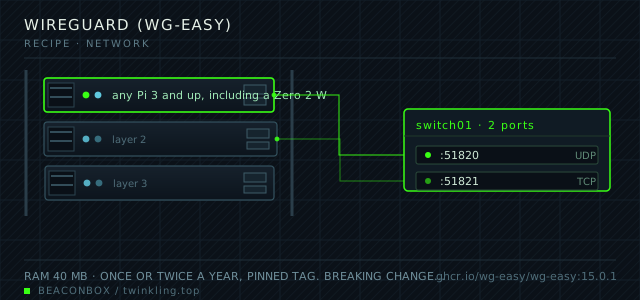
| image | ghcr.io/wg-easy/wg-easy:15.0.1 |
|---|---|
| host ports | :51820/udp, :51821/tcp |
| volume path | /srv/homelab/wg-easy/data |
| RAM | 40 MB |
| CPU share | 0.15 vCPU (cpus: "0.15") — the kernel does the work, not the container |
| update cadence | once or twice a year, pinned tag. Breaking changes are rare but the config file format has changed between major versions |
| arm64 | arm64 native; the container ships the wireguard-tools userspace, the kernel module comes from the host |
| host | container | proto | exposed | used for |
|---|---|---|---|---|
| :51820 | 51820 | udp | public | the tunnel itself; the only UDP port forwarded at the router |
| :51821 | 51821 | tcp | LAN only | web UI for creating client configs and reading handshake times |
Deployment steps
Generate the UI password hash on the host
The container takes a bcrypt hash, not a plaintext password. Generating it with the image itself avoids a version mismatch between your local bcrypt and the one in the container.
run docker run --rm ghcr.io/wg-easy/wg-easy:15.0.1 wgpw 'the-password' # prints PASSWORD_HASH='$2a$12$...' — put that line in /srv/homelab/.envForward exactly one port, and nothing else
51820/udp to the Pi, and 51821 stays closed. If you are behind carrier NAT without a public address, this is the step that cannot be done and you need a relay instead.
run # router: UDP 51820 -> 192.168.10.20 # verify from outside: nc -uzv your.public.ip 51820Start the container and create the first client
The first client config is generated in the UI. Import it by QR code on a phone; on a laptop use the downloadable .conf with the official client.
run cd /srv/homelab/wg-easy && docker compose up -d docker logs --tail 20 wg-easy docker exec wg-easy wg showProve split tunnel does what you think
With the tunnel up on a phone, a request to the Pi's LAN address should work and a request to a public IP-checking site should show your mobile carrier's address, not your home one. If the second shows your home address, AllowedIPs is wider than you set it.
run docker exec wg-easy wg show wg0 allowed-ips # expect 10.8.0.2/32 for a client, and the client side should route only the LANSave the data directory somewhere else too
Server keys and every client config live in one directory. Copy it after each change, and export an archive into the password manager at the same time — that archive is what saves you when the Pi is the thing that failed.
run tar czf /srv/homelab/backup/wg-easy-$(date +%F).tgz -C /srv/homelab/wg-easy data
One forwarded port instead of four
Before this, the rack had four ports forwarded: 443 for the proxy, and three application ports for the services that the family wanted to reach from outside. Every one of them was a login page exposed to the internet, and the log files showed the scanning starting within hours.
Now exactly one UDP port is forwarded. Nothing can be discovered by port scanning, because an unauthenticated WireGuard packet produces no response at all — unlike an HTTPS login page, which answers with a 200 and a password form.
| approach | ports open | what a scanner sees |
|---|---|---|
| forward each app | 443 + 3 app ports | four login pages to try passwords against |
| reverse proxy everything | 80 + 443 | one proxy, still a public attack surface |
| WireGuard + LAN-only apps | 443 + 51820/udp | a web server and silence on UDP |
Split tunnel by default
WG_ALLOWED_IPS is set to the LAN and the VPN subnet, not 0.0.0.0/0. That means the phone routes only rack traffic through the tunnel and everything else goes straight out over mobile data, which is faster, saves battery, and stops the Pi from becoming the bottleneck for someone else's video call.
Two devices get full-tunnel profiles: the laptop that gets used on cafe wifi, and the tablet that travels. Those two are the ones where the point is the encrypted exit, not the access.
DNS inside the tunnel, and why it is the useful part
Pointing WG_DEFAULT_DNS at the Pi-hole address is what makes the tunnel worth having for more than file access: ad blocking follows the phone onto mobile data, and the split-horizon names (jellyfin.lan, cloud.lan) resolve from anywhere.
The failure mode to know about is a phone that keeps the tunnel up on a captive-portal network, which makes every request fail until the portal is passed. Set it to on-demand rather than always-on for phones that travel.
docker exec wg-easy wg show
# latest handshake within the last two minutes means the peer is connected now
Revocation is the feature nobody tests
The reason to have one profile per device rather than one shared profile is revocation. A lost phone should cost one deletion, not a re-issue for the whole household.
Test it once: delete a profile, confirm wg show drops the peer, and confirm the phone gets nothing. It takes five minutes and it is the only way to know your revocation actually works.
compose file
Drop the whole file at /srv/homelab/wg-easy/compose.yaml. Tags are pinned, never latest: rolling back on a Pi is far more work than upgrading.
services:
  wg-easy:
    image: ghcr.io/wg-easy/wg-easy:15.0.1
    container_name: wg-easy
    restart: unless-stopped
    ports:
      - "51820:51820/udp"
      - "51821:51821/tcp"
    environment:
      TZ: Asia/Shanghai
      WG_HOST: rack.twinkling.top
      PASSWORD_HASH: ${WG_UI_HASH}
      WG_PORT: "51820"
      WG_DEFAULT_ADDRESS: 10.8.0.x
      WG_DEFAULT_DNS: 192.168.10.20
      WG_ALLOWED_IPS: 192.168.10.0/24,10.8.0.0/24
      WG_PERSISTENT_KEEPALIVE: "25"
    volumes:
      - /srv/homelab/wg-easy/data:/etc/wireguard
    cap_add:
      - NET_ADMIN
      - SYS_MODULE
    sysctls:
      - net.ipv4.conf.all.src_valid_mark=1
      - net.ipv4.ip_forward=1
    networks: [rack]

networks:
  rack:
    external: true
Hardening checklist
- the UI is on the LAN only and additionally behind basic auth at the proxy; it is never forwarded
- one client per device, named, so a lost phone can be revoked by deleting exactly one profile
- DNS inside the tunnel is set to the Pi-hole address, so blocking applies on the road too
- AllowedIPs is narrowed to the LAN for devices that should only reach the rack, and full-tunnel only for the two that need privacy on public wifi
Backup plan
the data directory holds the server key pair and every client config, so it is copied after any change and kept in the password manager as an exported archive. Losing it means re-issuing every phone and laptop profile, which is twenty minutes of work you do not want while travelling.
Verify it went in clean
- wg show lists a handshake within the last two minutes for the device you are testing from
- A phone on mobile data reaches jellyfin.lan and does not see ads, which proves DNS is going through the tunnel
- Deleting a peer stops that device immediately, verified from the device rather than from the UI
- Port 51821 is unreachable from outside the house
What bit us
- WG_HOST must be the public hostname or IP the client will connect to, not the LAN address. Getting it wrong produces a config that only works inside the house, which is the opposite of the point.
- A phone with a captive-portal wifi and an always-on tunnel cannot load the portal page, because the portal is not in AllowedIPs. Use on-demand activation.
- The kernel module is loaded from the host. On a Pi running a mainline kernel without the wireguard module built, the container starts and the tunnel never comes up — check lsmod | grep wireguard.
- Copying a client config into a second device works and defeats revocation. One profile per device, always.
Hardware questions
- WireGuard or Tailscale?
- WireGuard if you control the router and want no third party in the path; Tailscale if you are behind carrier NAT, want zero configuration and are willing to depend on someone else's coordination server. This rack runs both: WireGuard for the household, Tailscale on one node for a remote family member.
- Does the VPN slow down Jellyfin streaming from outside?
- The Pi's WireGuard throughput is around 90 Mbps on a Pi 4, which is enough for a direct-play 1080p stream and not enough for a 4K remux. If remote streaming is the main use, the honest answer is to keep the bitrate under 10 Mbps rather than to expect the Pi to push more.
- How much RAM does this cost?
- About 40 MB. The container is a control plane; the encryption happens in the kernel, so the resource cost does not scale with traffic in the way people expect.