Service card · Files & storage
Syncthing: the folder on three machines that stays the same
There is a category of files that needs to exist on several machines at once and needs no history: the household documents folder, the notes directory, the shared phone photos before they go into Immich. Syncthing keeps those identical across the rack, two laptops and a phone, with no server in the middle holding the authoritative copy — which is exactly the property that makes it different from Nextcloud.
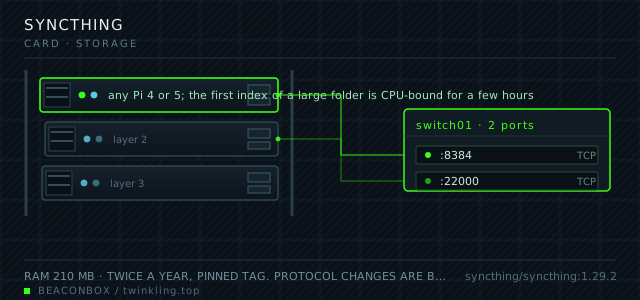
| image | syncthing/syncthing:1.29.2 |
|---|---|
| host ports | :8384/tcp, :22000/tcp |
| volume path | /srv/homelab/syncthing/data |
| RAM | 210 MB |
| CPU share | 0.40 vCPU (cpus: "0.40") — hashing on a large first sync is the peak |
| update cadence | twice a year, pinned tag. Protocol changes are backward compatible within reason, but the database format upgrades in place and does not downgrade |
| arm64 | arm64 native; file watching works and does not need the slower polling mode on a modern kernel |
| host | container | proto | exposed | used for |
|---|---|---|---|---|
| :8384 | 8384 | tcp | LAN only | web UI, used mostly to read the sync state and pause folders |
| :22000 | 22000 | tcp | LAN only | the sync protocol itself, between the rack and the laptops |
Deployment steps
Create both directories with the PUID you intend to keep
Changing the uid after the first sync leaves files the container cannot write, which shows up as a folder stuck at 95 percent.
run sudo mkdir -p /srv/homelab/syncthing/{config,data} sudo chown -R 1000:1000 /srv/homelab/syncthingSet the GUI password before any peer is added
The web interface has no authentication on first start. Set a password and a username in Settings -> GUI before the folder list has anything in it.
run cd /srv/homelab/syncthing && docker compose up -d # open http://192.168.10.20:8384 -> Settings -> GUI -> set user and passwordExchange device IDs by hand and add the three folders
Discovery is convenient and it is also how an unwanted peer asks to sync. Paste the ID from the other machine's interface rather than accepting the first prompt that appears.
run # on each laptop: Actions -> Show ID, copy the long string # on the rack: Add Remote Device -> paste, then share each folder explicitly
Syncthing or Nextcloud, because people confuse them
Nextcloud is a server that clients connect to; there is one copy on the server and the clients are views of it. Syncthing has no server: every device holds a complete copy and they gossip about which version is newest.
The practical difference shows up in failure. If the rack is down, Nextcloud is down and every client is stuck. With Syncthing, the laptops carry on syncing with each other and the rack catches up when it returns. The cost is disk space on every device and a conflict file when two machines edit the same document offline.
| Syncthing | Nextcloud | |
|---|---|---|
| authoritative copy | none, all peers are equal | the server |
| rack offline | laptops keep syncing | everyone is stuck |
| disk cost | full copy on every device | full copy on the server only |
| conflicts | a sync-conflict file appears | server decides by timestamp |
| share with someone outside | add their device ID | create a user and a share link |
The three folders, and why there are not more
household (the documents that matter: insurance, tenancy, appliance manuals), notes (the markdown that would otherwise live in one person's head), and staging (phone photos before they are imported into Immich and deleted from the phone).
Everything else is deliberately not synced. Code goes through git, media goes through the NAS, backups go one way only. Each folder added to Syncthing is disk space on every device plus one more thing to reason about when something conflicts.
Staggered versioning is the feature that saves the day
With versioning off, a delete on one device deletes on all of them within seconds and the file is gone everywhere. Staggered versioning keeps old versions for thirty days on the rack, which turns the most common disaster — someone tidying a folder and being wrong — into a non-event.
The .stversions directory lives next to the folder and is excluded from the synced set, so it does not propagate. Check its size once a month; on a documents folder it stays small, but it is worth knowing it exists before it is 20 GB.
# Folder -> Edit -> File Versioning -> Staggered
# keep versions for 30 days, cleanup interval 3600s
# then: du -sh /srv/homelab/syncthing/data/household/.stversions
compose file
Drop the whole file at /srv/homelab/syncthing/compose.yaml. Tags are pinned, never latest: rolling back on a Pi is far more work than upgrading.
services:
  syncthing:
    image: syncthing/syncthing:1.29.2
    container_name: syncthing
    restart: unless-stopped
    ports:
      - "8384:8384/tcp"
      - "22000:22000/tcp"
      - "22000:22000/udp"
    environment:
      TZ: Asia/Shanghai
      PUID: "1000"
      PGID: "1000"
      STGUIADDRESS: 0.0.0.0:8384
    volumes:
      - /srv/homelab/syncthing/config:/var/syncthing/config
      - /srv/homelab/syncthing/data:/var/syncthing/data
    networks: [rack]

networks:
  rack:
    external: true
Hardening checklist
- the web UI has a password and is reachable on the LAN only; the sync port is never forwarded
- device IDs are exchanged by hand rather than by discovery, so no uninvited peer can ask to sync
- the folder set is deliberately small: this is a document sync tool, not a backup target
- file versioning is set to staggered for the shared documents folder, so a mistaken delete is recoverable for thirty days without a backup restore
Backup plan
the synced folders are copies of things that also exist elsewhere, so the folder contents are not backed up from here — the NAS copies them independently. What is backed up is the Syncthing config and database, because re-indexing a 200 GB folder takes hours and re-creating the device IDs means re-accepting every peer.
Verify it went in clean
- A file created on a laptop appears on the rack and on the second laptop within a few seconds
- Deleting a file on one device and restoring it from .stversions on the rack works
- The web UI on the rack shows all three peers connected and the folder state as Up to Date rather than Syncing
- Pausing the folder, editing a file on two machines, and resuming produces exactly one conflict file rather than a lost edit
What bit us
- Syncing a folder that is also the target of a backup job creates a loop of changes. Keep the synced set and the backed-up set separate, or exclude the backup staging area explicitly.
- The container writes as the PUID and PGID you set. Switching those values after the first sync leaves files the container cannot write, which shows up as a folder stuck at 95 percent.
- Device IDs are long and easy to mistype. Copy them from the web UI rather than from a chat message, and remove old device entries rather than leaving them paused forever.
- Syncthing is not a backup and its own documentation says so. The versioning feature softens deletions; it does not protect against a ransomware event that encrypts every file in the folder on every device.
Hardware questions
- Can Syncthing replace the NAS?
- No, and it is not trying to. Syncthing keeps working copies identical across devices that are all in use; the NAS holds the archive and the version history. The two overlap only in the staging folder, and even there the NAS is what receives the copy.
- Is it fast enough over the LAN?
- It saturates a gigabit link on a Pi 4 for large files, and for the small-document workload it is usually used for, the bottleneck is usually hashing during the first index rather than transfer. The first sync of 200 GB takes a couple of hours and subsequent syncs are seconds.
- What about the phone?
- The Android app can sync a photos folder automatically, which is what the staging folder is for. The iOS app is more limited by the platform's background rules, so on iOS the practical pattern is a manual sync of the notes folder rather than automatic photo upload — for photos, the Immich app does the job better.