Deployment recipe · Files & storage
Paperless-ngx: the filing cabinet that answers questions
The scan-and-file workflow this replaces was a folder tree with a naming convention that two people disagreed about. Paperless-ngx takes the scans, OCRs them, guesses the correspondent and the date, and makes the whole thing searchable — which turns "where is the boiler warranty" from a twenty-minute search into a ten-second one.
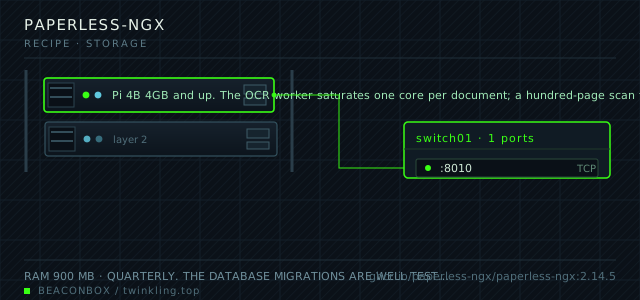
| image | ghcr.io/paperless-ngx/paperless-ngx:2.14.5 |
|---|---|
| host ports | :8010/tcp |
| volume path | /srv/homelab/paperless/media |
| RAM | 900 MB |
| CPU share | 1.0 vCPU (cpus: "1.0") — OCR is the only expensive operation and it is bursty |
| update cadence | quarterly. The database migrations are well tested, but the OCR language packs and the classification model need re-downloading after a major bump |
| arm64 | arm64 native including the Tesseract OCR binaries; OCR on a Pi is slow but completely usable for household volumes |
| host | container | proto | exposed | used for |
|---|---|---|---|---|
| :8010 | 8000 | tcp | LAN only | web UI for search, tagging and the document viewer |
Deployment steps
Create the three directories with the uid the container expects
USERMAP_UID sets the runtime user, and the media and data directories are written by it. The consume directory is on the NAS and needs the same treatment there.
run sudo mkdir -p /srv/homelab/paperless/{data,media,export} sudo chown -R 1000:1000 /srv/homelab/paperless sudo chown -R 1000:1000 /mnt/nas/paperless-consumeInstall the OCR language packs at first start
The image downloads language packs on first boot based on PAPERLESS_OCR_LANGUAGES. Starting it without them means every non-English document comes out empty.
run docker compose up -d paperless-db paperless-redis docker compose up -d paperless docker logs -f paperless | grep -i 'installing language' # wait for it to finish before uploading anythingCreate the accounts and close self-registration
The first account created through the sign-up form becomes the admin. Add the household accounts and turn registration off in the same sitting.
run # Admin -> Users -> Create user, then # Admin -> Settings -> disable 'Enable sign-ups'Set the OCR language and the worker counts before importing anything
Changing OCR language after ten thousand documents have been processed means re-running OCR on all of them. Set it first.
run docker exec paperless document_ocr --help docker exec paperless document_index reindex --help # both are available for the day a setting was wrong after allDo a test document, then a restore drill
Before committing the household archive, export and re-import into a scratch instance. Finding out that the export does not contain what you assumed is better now than after the old filing cabinet has been emptied.
run docker exec paperless document_exporter /usr/src/paperless/media/export --no-thumbnail du -sh /srv/homelab/paperless/media/export ls /srv/homelab/paperless/media/export | head
The intake path is the part that decides if this works
Paperless watches a consumption directory. Anything dropped in is processed: OCR, classification, tagging, and a rename based on the metadata. The household pattern here is that the scanner writes to a folder on the NAS and never to Paperless directly, so a failed scan is a file sitting in a folder rather than a job that vanished.
A second consumption subfolder is set up with a different naming convention for the documents that should be treated as incoming correspondence rather than archived records. Getting the consumption structure right at the start saves re-tagging a thousand documents later.
# consume/           -> normal intake
# consume/inbox/     -> mail and bills, tagged as incoming
# drop a PDF in and watch it process
docker logs -f paperless | grep -i consuming
OCR on a Pi: slow, but the right kind of slow
Tesseract on a Pi 4 processes about twenty-five pages a minute at default settings. A ten-page utility bill takes twenty seconds; a hundred-page mortgage document takes four minutes and pins one core while it does.
The worker count is deliberately set to one. Two OCR workers on a four-core board make everything else on the rack feel sluggish, and there is no household volume of documents that justifies the second one.
| document | pages | time on a Pi 4 | CPU |
|---|---|---|---|
| utility bill | 3 | about 8 seconds | one core, brief |
| insurance policy | 24 | about 60 seconds | one core |
| mortgage file | 120 | about 5 minutes | one core, sustained |
| scanned photo, no text | 1 | about 2 seconds | one core, brief |
Filename format and consumer-grade metadata
The filename format is a template over the metadata fields and it is applied at consumption time, not at rename time. Choosing it late means either living with inconsistent names or triggering a re-processing of the whole archive.
Dates are the field most likely to be wrong, because Paperless guesses them from the document text. For anything where the date matters legally, open the document and correct the date before it disappears into the archive, because a wrong date is harder to find later than a missing one.
PAPERLESS_FILENAME_FORMAT: '{created}-{correspondent}-{title}'
# -> 2026-03-14-Northwind Energy-Annual statement.pdf
# change it and run: document_renamer
The export is the real backup
The media directory alone is not enough: without the database, the tags, the correspondents and the document types all vanish, leaving a pile of correctly named PDFs. Without the media directory the database is a list of documents that do not exist.
document_exporter writes both plus the metadata into one portable tree that a future version of Paperless can re-import. It runs monthly here, on top of the nightly file-level copy, because it is the only artefact that survives a complete rebuild of the stack.
docker exec paperless document_exporter /usr/src/paperless/media/export \
  --no-thumbnail --use-filename-format
# the export tree is self-describing and re-importable
compose file
Drop the whole file at /srv/homelab/paperless-ngx/compose.yaml. Tags are pinned, never latest: rolling back on a Pi is far more work than upgrading.
services:
  paperless:
    image: ghcr.io/paperless-ngx/paperless-ngx:2.14.5
    container_name: paperless
    restart: unless-stopped
    ports:
      - "8010:8000/tcp"
    environment:
      TZ: Asia/Shanghai
      PAPERLESS_REDIS: redis://paperless-redis:6379
      PAPERLESS_DBHOST: paperless-db
      PAPERLESS_DBNAME: paperless
      PAPERLESS_DBUSER: paperless
      PAPERLESS_DBPASS: ${PAPERLESS_DB_PASSWORD}
      PAPERLESS_OCR_LANGUAGES: eng chi_sim
      PAPERLESS_OCR_LANGUAGE: eng+chi_sim
      PAPERLESS_TIME_ZONE: Asia/Shanghai
      PAPERLESS_URL: https://docs.lan
      PAPERLESS_OCR_MODE: skip_noarchive
      PAPERLESS_FILENAME_FORMAT: '{created}-{correspondent}-{title}'
      PAPERLESS_TASK_WORKERS: "1"
      PAPERLESS_THREADS_PER_WORKER: "1"
      USERMAP_UID: "1000"
      USERMAP_GID: "1000"
    volumes:
      - /srv/homelab/paperless/data:/usr/src/paperless/data
      - /srv/homelab/paperless/media:/usr/src/paperless/media
      - /mnt/nas/paperless-consume:/usr/src/paperless/consume
    depends_on:
      paperless-db:
        condition: service_healthy
    networks: [rack]

  paperless-redis:
    image: redis:7.4-alpine
    container_name: paperless-redis
    restart: unless-stopped
    networks: [rack]

  paperless-db:
    image: postgres:16-alpine
    container_name: paperless-db
    restart: unless-stopped
    environment:
      POSTGRES_DB: paperless
      POSTGRES_USER: paperless
      POSTGRES_PASSWORD: ${PAPERLESS_DB_PASSWORD}
    volumes:
      - /srv/homelab/paperless/db:/var/lib/postgresql/data
    healthcheck:
      test: ["CMD-SHELL", "pg_isready -U paperless"]
      interval: 10s
      timeout: 5s
      retries: 6
    networks: [rack]

networks:
  rack:
    external: true
Hardening checklist
- the instance sits behind the authentication portal, because a searchable index of every household document is not something to leave on one_factor if it can be helped
- user accounts are per person and the admin account is only used for configuration, so an ordinary session cannot change the pipeline rules
- the consumption directory is a folder on the NAS that only one household account can write to, which is the intake path for the scanner
- the OCR language set is trimmed to the languages actually in use, both for speed and because unused language packs are extra untested parsing code
Backup plan
three things have to be copied together and they are worthless apart: the media directory with the original files and their OCR text, the database, and the consumption directory. The export command writes a portable archive of everything, which is run monthly as the belt-and-braces copy.
Verify it went in clean
- A dropped PDF appears in the archive with searchable text within a minute of being consumed
- Searching for a phrase that exists only in a scanned page returns the document, which proves OCR ran
- The document_exporter output re-imports into a scratch instance with the same tag structure
- The consumption directory is empty after a batch is processed, with anything failed moved to the failed folder rather than looping
What bit us
- A PDF with no OCR layer and an unreadable scan mode setting produces a document with no text and no error. Check the OCR mode before bulk-importing a decade of scans.
- Postgres and the media directory must be backed up together. A media directory restored against an older database produces documents that exist as files but not as records.
- Changing the filename format after import renames nothing until document_renamer is run, and running it changes paths that any external links were pointing at.
- The consumption directory must not be the same folder the scanner writes to directly. A half-written file being consumed produces a corrupt document in the archive.
Hardware questions
- Is a Pi fast enough to OCR a real archive?
- For household volumes, yes. A thousand documents averaging four pages is about two and a half hours of background OCR at one page per two and a half seconds. Run it overnight and it is done. Where the Pi struggles is bulk-importing fifty thousand pages, which is a job to do on a laptop and then move the data directory over.
- What happens to documents that were scanned badly?
- They end up in the archive with poor text but the original image intact, so they are still findable by the metadata you correct by hand. Re-scanning is possible but rare; better scanners and a 300 dpi setting prevent the problem rather than fixing it.
- Can I use this for documents I might need to hand to someone official?
- Yes, and the export tree is designed for exactly that: the originals, PDF/A versions where the mode is enabled, and the OCR text side by side. For legal matters the originals are what count, which is why the consume workflow never modifies the source file.