Service card · Automation
Mosquitto: the message bus under the sensors
Twenty-five megabytes of RAM and it is the piece everything sensor-shaped talks through. Mosquitto is the reference MQTT broker: sensors publish readings to topics, Home Assistant subscribes, and nobody needs to know anybody's IP address. It is also the service on this rack where the default configuration is genuinely dangerous and needs to be replaced before the first device connects.
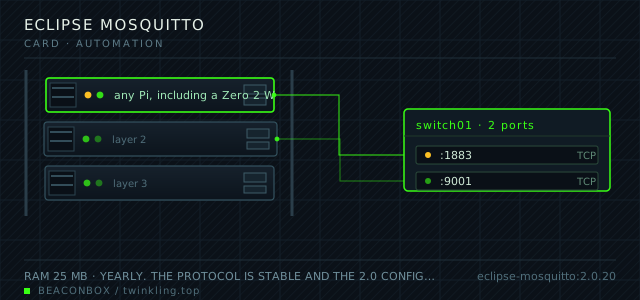
| image | eclipse-mosquitto:2.0.20 |
|---|---|
| host ports | :1883/tcp, :9001/tcp |
| volume path | /srv/homelab/mosquitto/data |
| RAM | 25 MB |
| CPU share | 0.10 vCPU (cpus: "0.10") — this is the cheapest service on the rack by a wide margin |
| update cadence | yearly. The protocol is stable and the 2.0 configuration file is not going to change again soon |
| arm64 | arm64 native; one of the few services here that has no meaningful architecture dependency at all |
| host | container | proto | exposed | used for |
|---|---|---|---|---|
| :1883 | 1883 | tcp | LAN only | MQTT for the sensors and the dashboards that read them |
| :9001 | 9001 | tcp | LAN only | WebSocket listener for browser dashboards |
Deployment steps
Generate the password file with mosquitto_passwd, one user per device
The file must be readable by the container's user. A permission error here presents itself as every device suddenly having the wrong password.
run docker run --rm -it -v /srv/homelab/mosquitto/config:/cfg \ eclipse-mosquitto:2.0.20 mosquitto_passwd -c -b /cfg/passwd kitchen-sensor 'LONG-SECRET' docker run --rm -it -v /srv/homelab/mosquitto/config:/cfg \ eclipse-mosquitto:2.0.20 mosquitto_passwd -b /cfg/passwd homeassistant 'OTHER-SECRET'Write the ACL file before the first device connects
Adding ACLs after a device has been running means the device has already had access it should not have had. Write the file first, then connect the device.
run cat > /srv/homelab/mosquitto/config/acl <<'EOF' user kitchen-sensor topic write home/kitchen/# topic read home/kitchen/cmd user homeassistant topic read # topic write home/# EOFProve the refusal path with a client that has no credentials
A broker that accepts an anonymous client is a broker that leaks the whole house's state. Test the refusal explicitly rather than trusting the configuration file.
run docker compose up -d mosquitto mosquitto_sub -h 192.168.10.20 -p 1883 -t '#' -C 1 # expect: Connection error: Connection Refused: not authorised. docker exec mosquitto tail -5 /mosquitto/log/mosquitto.log
The default listener is anonymous and that must change first
Mosquitto 2.0 refuses to start with the permissive defaults from version 1 unless allow_anonymous is set explicitly, which is an improvement — but the tutorials still start with allow_anonymous true. Anyone who can reach port 1883 with that setting can read every topic, including the ones that reveal when the house is empty.
The configuration here is explicit: no anonymous clients, a password file, and an ACL file that gives each device exactly the topics it needs.
# /srv/homelab/mosquitto/config/mosquitto.conf
listener 1883 0.0.0.0
allow_anonymous false
password_file /mosquitto/config/passwd
acl_file /mosquitto/config/acl
persistence true
persistence_location /mosquitto/data/
log_dest file /mosquitto/log/mosquitto.log
ACLs are what stop a compromised sensor
An ESP sensor with a known password should not be able to subscribe to the topic that says whether anyone is home. Topic-level ACLs are enforced by the broker and cost nothing to set up.
The pattern here is one user per device, named after the device, with publish rights only on its own subtree and subscribe rights only on the command topic that controls it.
# /srv/homelab/mosquitto/config/acl
user kitchen-sensor
topic write home/kitchen/#
topic read home/kitchen/cmd

user homeassistant
topic read #
topic write home/#
WebSockets exist for one reason
The browser cannot open a raw TCP MQTT connection, so the WebSocket listener on 9001 exists for the wall-mounted dashboard that subscribes directly to topics. Everything else in the house uses plain MQTT on 1883.
The WebSocket listener is the one that gets a bad reputation, because browser clients are the easiest place to leak credentials. The dashboard holds a read-only account, which is the only mitigation that matters.
compose file
Drop the whole file at /srv/homelab/mosquitto/compose.yaml. Tags are pinned, never latest: rolling back on a Pi is far more work than upgrading.
services:
  mosquitto:
    image: eclipse-mosquitto:2.0.20
    container_name: mosquitto
    restart: unless-stopped
    ports:
      - "1883:1883/tcp"
      - "9001:9001/tcp"
    environment:
      TZ: Asia/Shanghai
    volumes:
      - /srv/homelab/mosquitto/config:/mosquitto/config
      - /srv/homelab/mosquitto/data:/mosquitto/data
      - /srv/homelab/mosquitto/log:/mosquitto/log
    networks: [rack]

networks:
  rack:
    external: true
Hardening checklist
- anonymous access is disabled and every client authenticates with a username and password
- per-client ACLs mean the ESP sensors can only publish to their own topic branch and cannot subscribe to anyone else's
- the listener is bound to the LAN and is not forwarded; remote sensors connect through WireGuard
- TLS is configured on the LAN listener with a locally trusted certificate, so credentials are not sent in the clear even inside the house
Backup plan
the broker's persistence database holds queued messages and retained values; losing it means sensors republish their state within one reporting interval and retained topics come back empty until the next reading. Only the configuration and the password file are worth copying, and both are tiny.
Verify it went in clean
- A client with no credentials is refused, and the refusal appears in the broker log
- The kitchen sensor can publish to its own topic and is refused when it tries to read the presence topic
- A retained message published to a topic is delivered immediately to a new subscriber
- The broker restarts with the same password file and every device reconnects without reconfiguration
What bit us
- Password files are created with mosquitto_passwd, not by hand, and the file must be readable by the container's user. A permission error here looks like every device suddenly having the wrong password.
- Retained messages persist across broker restarts and are delivered to every new subscriber. A stale retained reading from a sensor that has since been removed will sit in the dashboard forever until someone publishes an empty payload to clear it.
- The persistence database grows with queued messages for offline clients. A device that goes offline with a subscription at QoS 1 makes the broker queue everything for it; setting a maximum queued message count per client prevents a slow leak.
- One wildcard subscription from a misconfigured client can pull the entire topic tree. The ACL file is where that is stopped, not in the client.
Hardware questions
- Do I need MQTT if I only have Zigbee devices?
- Not necessarily. Home Assistant can talk to a Zigbee coordinator directly, and adding a broker that nothing publishes to is a service to maintain for no reason. MQTT earns its place when there are ESP-based sensors or DIY devices that speak it natively, which is where most of the interesting projects end up.
- Why is the RAM usage so low compared to everything else here?
- Because a broker is a routing table and a set of subscriptions, not an application. Twenty-five megabytes is mostly the process overhead; the message volume in a house is trivial. It is included in this rack precisely because it costs nearly nothing and removes a lot of point-to-point configuration.
- Should the broker be exposed to the internet for remote sensors?
- No. Remote sensors belong on the WireGuard tunnel, and that is how the one sensor in the garage of a relative's house connects. Exposing 1883 publicly invites the brute-force traffic that MQTT brokers get, and there is no benefit that the tunnel does not provide.