Deployment recipe · Automation
Home Assistant on the rack: the part of the house that is not a cloud service
Home Assistant is the reason the rack exists in some houses and the reason it gets a second SSD in this one. It is also the only service here that needs host networking, a privileged container and two USB sticks passed through, which makes it the one that is genuinely tied to this specific machine rather than being a container you could move anywhere.
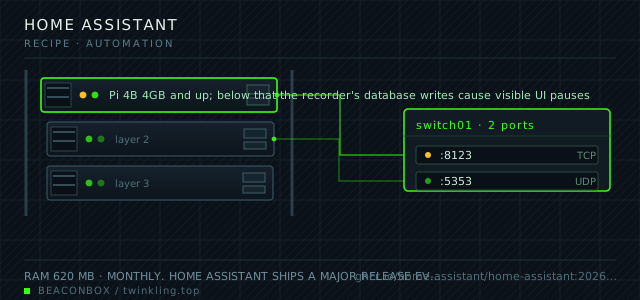
| image | ghcr.io/home-assistant/home-assistant:2026.9.1 |
|---|---|
| host ports | :8123/tcp, :5353/udp |
| volume path | /srv/homelab/homeassistant/config |
| RAM | 620 MB |
| CPU share | 0.60 vCPU (cpus: "0.60") — recorder writes and automations are bursty |
| update cadence | monthly. Home Assistant ships a major release every month with breaking changes listed in the release notes; read them, because integrations are renamed and YAML keys are retired with little ceremony |
| arm64 | arm64 native; the Z-Wave and Zigbee radios need a USB stick passed through, which is the one part of this stack that is genuinely host-dependent |
| host | container | proto | exposed | used for |
|---|---|---|---|---|
| :8123 | 8123 | tcp | LAN only | the web UI and the companion app's API |
| :5353 | 5353 | udp | LAN only | mDNS discovery for Cast devices and ESPHome nodes |
Deployment steps
Create the config directory and let the container own it
The homeassistant image writes as root and refuses to run if the config directory is not writable. This is one of the few services here where the config directory is root-owned by design.
run sudo mkdir -p /srv/homelab/homeassistant/config sudo chown -R root:root /srv/homelab/homeassistantGive the radios stable device names before starting anything
Find the stick's vendor and product id with lsusb, write the udev rule, reload, and confirm the symlink exists. Doing this after the fact means re-pairing every device.
run lsusb | grep -i -E 'zigbee|conbee|sonoff|zwave' ls -l /dev/zigbee /dev/ttyUSB* sudo udevadm control --reload-rules && sudo udevadm triggerStart it with host networking and check the discovery
Bridge networking breaks mDNS discovery for Cast devices and ESPHome nodes in ways that look like the devices are offline. Host networking is not optional here.
run cd /srv/homelab/homeassistant && docker compose up -d docker logs --tail 40 homeassistant # open http://192.168.10.20:8123 and create the owner accountMove the secrets out of configuration.yaml into secrets.yaml
Anything with a token, a password or a key goes into secrets.yaml and is referenced by !secret. Add that file to .gitignore in the same commit that creates it.
run cat > /srv/homelab/homeassistant/config/secrets.yaml <<'EOF' mqtt_password: CHANGE_ME zigbee_network_key: CHANGE_ME EOF chmod 600 /srv/homelab/homeassistant/config/secrets.yamlSet up git and one automation that proves the loop works
A repository with no working automation is a repository you will not maintain. Start with the container-down notification, because it also tells you when the other services on the rack fail.
run cd /srv/homelab/homeassistant/config git init && printf 'secrets.yaml\n*.db\n*.db-*\n.homeassistant/\n' > .gitignore git add -A && git commit -m 'initial configuration'
The radios are the hard part, not the software
Everything about Home Assistant is portable except the radios. Zigbee and Z-Wave devices talk to a USB stick, the stick lives at a device path, and that path changes if it is unplugged and replugged into a different port. The fix is a udev rule that gives the stick a stable name, so the compose file can reference /dev/zigbee forever instead of /dev/ttyACM0 today and /dev/ttyUSB1 tomorrow.
Thread and Matter devices go over the network rather than a stick, which is tidier, but they need IPv6 and an mDNS reflector that works across the container boundary — one more reason this runs with host networking.
# /etc/udev/rules.d/99-zigbee.rules
SUBSYSTEM=="tty", ATTRS{idVendor}=="10c4", ATTRS{idProduct}=="ea60", SYMLINK+="zigbee", GROUP="dialout", MODE="0660"

# then: sudo udevadm control --reload-rules && sudo udevadm trigger
# and reference /dev/zigbee in the compose file
The recorder will eat the SSD if you let it
Every entity state change is a row. A house with forty sensors produces tens of thousands of rows a day, and the default configuration keeps them for ten days and never purges the database file, so the SQLite file grows even after old rows are deleted.
Two settings fix it: a fourteen-day purge with an automatic repack, and an exclude list for the entities that change constantly and tell you nothing — the power monitoring on a laptop charger, the uptime sensors, anything that updates every second.
# configuration.yaml
recorder:
  purge_keep_days: 14
  auto_purge: true
  auto_repack: true
  exclude:
    domains:
      - updater
      - automation
    entity_globs:
      - sensor.*_uptime
      - sensor.*_linkquality
      - sensor.*_rssi
Automations that are worth having, and the ones that are not
The automations that survive are the boring ones: lights that follow the sun rather than a clock, a notification when the washing machine finishes drawing power, a warning when the freezer temperature rises for no reason, and a nightly check that all the other containers on this rack are still up.
The ones that get deleted are the ones that surprise people. Anything that locks a door, turns off a heater or arms an alarm from a sensor alone should require a second condition and be easy to override from a physical switch. A smart house that is occasionally wrong about whether someone is home is worse than a dumb one.
docker exec homeassistant python -m homeassistant --script check_config -c /config
# run this before every restart; a YAML error at boot leaves the UI showing the last good state
The database, the history and what happens without it
Home Assistant's SQLite database holds the state history and the long-term statistics. Losing it loses the graphs, not the configuration — the configuration is YAML files and the entities come back from the radios. That distinction is worth knowing before a restore: recovering the config directory is enough to run the house, and the history is a nice-to-have.
The config directory, on the other hand, is the whole installation. It is in git, it is in the nightly archive, and it is the thing to grab first if the house is on fire and you have thirty seconds.
docker exec homeassistant sqlite3 /config/home-assistant_v2.db "VACUUM INTO '/config/backup.db'"
# a consistent snapshot of a database that is being written to
compose file
Drop the whole file at /srv/homelab/home-assistant/compose.yaml. Tags are pinned, never latest: rolling back on a Pi is far more work than upgrading.
services:
  homeassistant:
    image: ghcr.io/home-assistant/home-assistant:2026.9.1
    container_name: homeassistant
    restart: unless-stopped
    network_mode: host
    privileged: true
    environment:
      TZ: Asia/Shanghai
    volumes:
      - /srv/homelab/homeassistant/config:/config
      - /etc/localtime:/etc/localtime:ro
      - /run/dbus:/run/dbus:ro
    devices:
      - /dev/ttyACM0:/dev/ttyACM0
      - /dev/ttyUSB0:/dev/ttyUSB0
Hardening checklist
- the instance is on the LAN and through WireGuard only; it is never forwarded, because an exposed Home Assistant is an exposed door lock
- long-lived access tokens are issued per integration and revoked when that integration is removed
- the secrets file holds every credential and is excluded from git by name, with a pre-commit hook that refuses to commit anything matching the key patterns
- the recorder is limited to fourteen days so the database cannot grow without bound, which is a reliability measure as much as a privacy one
Backup plan
the config directory is a git repository with the secrets file excluded, and the built-in backup produces a full archive that goes to the NAS. Both matter: the git history shows what changed, the archive is what restores a running instance in one step.
Verify it went in clean
- A Zigbee device pairs and reports its state after a container restart, proving the udev symlink survived
- The recorder database is smaller than 200 MB after a week of running with the exclude list in place
- check_config passes before a restart leaves the UI untouched
- The container-down automation fires when another service is stopped on purpose and the notification arrives on the phone
What bit us
- The /dev path of a USB stick changes between reboots and between USB ports. If devices randomly go offline after a reboot, this is why — the udev rule is the fix, not a container restart.
- privileged: true plus device passthrough gives this container the ability to do a great deal. Keep it on the LAN, keep the tokens scoped, and do not add the reverse proxy public rule that everyone's tutorial includes.
- A YAML error introduced through the UI's file editor does not stop the running instance; it stops the next restart. Run check_config before restarting rather than discovering the error when the house is already down.
- The default recorder settings grow the database without bound on a busy installation. The purge and repack settings are not optional if this runs for years on the same SSD.
Hardware questions
- Should Home Assistant run in a container or on its own device?
- In a container if you already have a rack and can pass the USB sticks through. On its own device if the radios have to be somewhere specific in the house — a Pi 4 in the networking cupboard with a Zigbee stick on a one-metre extension cable is a common and sensible arrangement, and the container can live on the rack while the radio lives elsewhere only if you use a network-attached coordinator.
- How much of the house can this actually control if there is no cloud?
- Everything that speaks Zigbee, Z-Wave, Matter, or a local protocol. The things that do not work are the appliances that only accept a cloud API — some robot vacuums, some washing machines, most doorbells — and those become either a local integration through a community project or a device that stays on the vendor's app.
- What breaks when the internet is down?
- Local control keeps working: lights, sensors, automations, the UI over the LAN. What stops is anything with a cloud dependency, plus the companion app's push notifications if they route through the vendor's servers. Set up local push where the integration supports it, and keep the internet-free behaviour in mind when choosing which devices to automate.