Deployment recipe · Dev & git
Gitea on the rack: git that does not need a subscription
Everything else in this house depends on a repository somewhere: the Caddyfile, the compose files, the dashboard JSON, the notes that explain why the buffer pool is 512 MB. Putting them on a free hosted service works until the service changes its terms. Gitea on the Pi is 320 MB of RAM and a SQLite file, and it makes the rack self-describing.
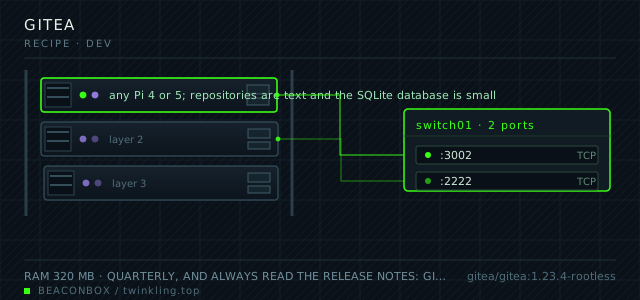
| image | gitea/gitea:1.23.4-rootless |
|---|---|
| host ports | :3002/tcp, :2222/tcp |
| volume path | /srv/homelab/gitea/data |
| RAM | 320 MB |
| CPU share | 0.50 vCPU (cpus: "0.50") |
| update cadence | quarterly, and always read the release notes: Gitea ships database migrations that run on first boot and there is no downgrade |
| arm64 | arm64 native, and the rootless tag avoids running git with capabilities it does not need |
| host | container | proto | exposed | used for |
|---|---|---|---|---|
| :3002 | 3000 | tcp | LAN only | web UI, HTTP git remote and the API |
| :2222 | 2222 | tcp | LAN only | SSH remote for git, which is what makes push work from a laptop |
Deployment steps
Create both directories with the uid the rootless image uses
The rootless image runs as uid 1000 and does not have permission to create its own config directory. Both volumes need that ownership before the first start.
run sudo mkdir -p /srv/homelab/gitea/{data,config} sudo chown -R 1000:1000 /srv/homelab/giteaGenerate the secret key before the first boot
Gitea writes a SECRET_KEY on first start if one is missing, and that key signs sessions. Setting it from the environment means a rebuild does not log everyone out.
run echo "GITEA__security__SECRET_KEY=$(openssl rand -base64 32)" >> /srv/homelab/.env echo "GITEA__security__INTERNAL_TOKEN=$(openssl rand -base64 48)" >> /srv/homelab/.envStart it and create the admin account immediately
The first registered account becomes the admin. Register it before closing registration, and do it over the LAN rather than through the proxy.
run cd /srv/homelab/gitea && docker compose up -d docker logs --tail 30 gitea # open http://192.168.10.20:3002 and register the adminClose registration and add the SSH client entry
Registration is disabled by the environment variable already; confirm it in the UI, because a config file written on first boot can carry a stale value.
run docker exec gitea gitea admin user list # expected: your admin account, and no sign-up option on the login pagePush one repository and prove the SSH remote works
Test with a throwaway repository before moving real configuration in. A remote that works over HTTPS and fails over SSH is a key or a port problem, and finding that out later is worse.
run cd /tmp && git clone [email protected]:ops/sandbox.git && cd sandbox git commit --allow-empty -m 'first commit over ssh' && git push # push must succeed without asking for a password
SQLite is the right database at this size
Gitea's documentation suggests MySQL or Postgres for production, and for a team it is right. For one household with twenty repositories and no concurrent pushes, SQLite means one less container, one less password, and a backup that is a file copy.
The point at which this stops being true is concurrent writes: two people pushing at the same moment on a large repository will occasionally see a lock error. If that starts happening, moving to Postgres is a documented migration, not a rebuild.
The SSH port choice is deliberate
Gitea's SSH remote listens on 2222 rather than 22 for a reason that has nothing to do with the host's own SSH server: it makes it impossible to forward a port at the router and accidentally expose the repository service, because the port number is not the one anyone forwards.
The client side is one line in ~/.ssh/config, and after that git clone works like any other remote.
# ~/.ssh/config
Host git.lan
  HostName 192.168.10.20
  Port 2222
  User git
  IdentityFile ~/.ssh/id_ed25519

# then: git clone [email protected]:ops/rack-config.git
What actually lives in the repositories
Four repositories, and each one exists because a file needed a history: rack-config (compose files and the Caddyfile), rack-notes (the runbook: what breaks, what was tried, why the buffer pool is 512 MB), rack-backup (scripts and the restore drills), and rack-dashboards (Grafana JSON).
The backup one is the one people skip and the one that matters, because a backup script that has never been reviewed is a backup script that quietly stopped working four months ago. GitHub Actions is not needed for that — a weekly manual look at the job output in Grafana is enough at this scale.
Actions, webhooks and the temptation of CI on a Pi
Gitea Actions works and runs a runner container that can execute your CI on the same board. It is tempting and mostly a mistake here: a build that pins the Pi's CPU for four minutes makes every other service on the rack slow, and the repositories this household keeps are configuration files that do not need to be compiled.
The one automation worth having is a webhook that posts to the notification channel when a repository receives a push to main. That is five lines of configuration and it catches the case where a change was made at midnight and forgotten.
# Repository -> Settings -> Webhooks -> Add webhook
# POST to the notification endpoint on push events, main branch only
compose file
Drop the whole file at /srv/homelab/gitea/compose.yaml. Tags are pinned, never latest: rolling back on a Pi is far more work than upgrading.
services:
  gitea:
    image: gitea/gitea:1.23.4-rootless
    container_name: gitea
    restart: unless-stopped
    ports:
      - "3002:3000/tcp"
      - "2222:2222/tcp"
    environment:
      TZ: Asia/Shanghai
      GITEA__database__DB_TYPE: sqlite3
      GITEA__server__DOMAIN: git.lan
      GITEA__server__ROOT_URL: https://git.lan/
      GITEA__server__SSH_PORT: "2222"
      GITEA__service__DISABLE_REGISTRATION: "true"
      GITEA__service__REQUIRE_SIGNIN_VIEW: "true"
      GITEA__repository__DEFAULT_BRANCH: main
    volumes:
      - /srv/homelab/gitea/data:/var/lib/gitea
      - /srv/homelab/gitea/config:/etc/gitea
    networks: [rack]

networks:
  rack:
    external: true
Hardening checklist
- registration is disabled and accounts are created by the admin only
- the SSH port for git is 2222, not 22, so a blocked or forwarded port 22 can never reach the repository service by accident
- two-factor is required for the admin account, and the API tokens in use are scoped read-only except the one the backup job uses
- LFS is enabled but object storage stays local; large binaries are discouraged in the contributing notes rather than silently filling the SSD
Backup plan
gitea dump produces a single archive with the database, the repositories, the configuration and the attachments. It runs weekly and on demand before every upgrade, and the archive is copied to the NAS. Repositories also exist on the laptops that push to them, which is a real second copy for everything except the issues.
Verify it went in clean
- git push over SSH works from a laptop with no password prompt
- gitea dump produces an archive containing both the database and the repositories
- The admin account has two-factor enabled and the login page offers no registration link
- Rendering a Markdown file with a relative image link works, which proves the raw path and ROOT_URL are consistent
What bit us
- GITEA__server__ROOT_URL must be the address clients actually use, including the scheme. Behind the proxy with the wrong value every clone URL, avatar and webhook body points at the container hostname.
- The rootless image cannot bind to port 22, which is one more reason the SSH remote is on 2222. Setting SSH_PORT to 22 in the config produces a service that starts and refuses every connection.
- Upgrades run database migrations on boot and there is no downgrade path. Take a dump before every version bump; it takes fifteen seconds and it is the difference between a bad afternoon and a restore.
- An SSH key added to Gitea is not the same as a key added to the host. Pushing as [email protected] uses the container's key store, and copying a key into ~/.ssh/authorized_keys instead will quietly do nothing.
Hardware questions
- Why not just use a free hosted git service?
- For public code, use it. What changed here is that the repositories are the rack's configuration, and configuration that lives behind someone else's account system is configuration you cannot restore when that account has a problem. The Pi holding the configuration and the backups it describes are not the same machine, which is the point.
- How much disk does a self-hosted git server need?
- About 40 MB for the application and 250 MB for twenty small repositories including their history, plus whatever LFS objects you allow. On the SSD this is a rounding error; on an SD card it is another reason to move the whole /srv tree to the SSD.
- Can Gitea run the CI for the rack's own configuration?
- It can, and it is worth it for exactly one job: validating the Caddyfile and the compose files before they are applied. That job takes two seconds and does not need a runner pinned to the Pi — caddy validate and docker compose config can run in the same second as the webhook.